
Automated SEO Monitoring: Setup and Best Practices

Modest Mitkus · October 19, 2026
Manual SEO checks eat hours every week. You log into Search Console, refresh rank trackers, compare last month's traffic, check if new pages indexed, scan for broken links, then repeat it all next week. Automated seo monitoring removes that cycle by running those checks in the background and alerting you only when something breaks or changes. You set rules once, connect your data sources, and get notified when rankings drop, pages disappear from the index, or Core Web Vitals fail. The setup takes a weekend, but the time saved compounds month after month.
Why Automation Beats Manual Checks
Manual monitoring creates gaps. You check once a week, but Google processes algorithm updates, crawls your site, and indexes (or de-indexes) pages every day. A broken canonical tag might sit unnoticed for two weeks. A ranking drop from position 3 to 12 happens mid-week and you miss the cause.
Automated systems check continuously. They spot issues the day they appear, log the exact time a ranking changed, and correlate drops with known algorithm updates or site changes. You get the data point when it matters, not after the damage spreads.
Key benefits of automated seo monitoring:
- Faster detection: Alerts fire within hours of a ranking drop or indexing issue
- Historical data: Every check is logged, so you can review what changed and when
- Reduced workload: No more manual export-compare-spreadsheet cycles each Monday
- Better root-cause analysis: Timestamp-based logs tie issues to deploys, updates, or external events
The trade-off is upfront setup cost. You need to connect APIs, write alert rules, and test thresholds. Small sites with 20 pages might not need it. Sites publishing daily or managing 500+ keywords save 5-10 hours per month.
What to Monitor Automatically
Not every metric needs automation. Focus on the signals that break your traffic or indicate search engine problems.
Rankings and SERP Visibility
Track keyword positions daily for your core 50-100 keywords. Set alerts when:
- A top-10 keyword drops below position 15
- Any keyword falls more than 5 positions in one day
- A competitor enters the top 3 for your primary keyword
Most rank trackers (Ahrefs, SEMrush, SerpWatcher) offer API access or webhook integrations. Pull daily rank snapshots and compare week-over-week. Ignore minor fluctuations (position 7 to 9), alert on structural drops (position 4 to 18).

Indexing and Crawl Health
Google crawls and indexes on its own schedule. Pages can drop from the index without warning. Monitor:
- Total indexed pages: Google Search Console API reports indexed count; alert if it drops more than 5% week-over-week
- Crawl errors: 404s, server errors, redirect chains that block Googlebot
- Sitemap submission status: Unprocessed sitemaps or XML syntax errors
- Robots.txt changes: Accidental blocks that de-index entire sections
Pull Search Console data daily via API. Compare indexed pages, average crawl rate, and error counts against your baseline. A sudden 20% drop in indexed pages usually means a robots.txt mistake or a canonical tag pointing to the wrong URL.
Core Web Vitals and Page Speed
Google uses Core Web Vitals (LCP, FID, CLS) as ranking signals. Page speed regressions hurt mobile rankings especially. Automate:
- Lighthouse CI runs in your deploy pipeline and blocks merges if LCP exceeds 2.5 seconds
- Real User Monitoring (RUM) via Google Analytics tracks field data across actual visitors
- Scheduled Lighthouse audits (once daily) on top landing pages
Lighthouse CI integrates with GitHub Actions, GitLab CI, or Jenkins. It runs a Lighthouse audit on every commit, saves the report, and fails the build if performance budgets break. You catch the regression before it hits production.
| Metric | Lighthouse CI Threshold | Alert Trigger |
|---|---|---|
| LCP | ≤ 2.5s | > 3.0s |
| FID | ≤ 100ms | > 200ms |
| CLS | ≤ 0.1 | > 0.25 |
Backlinks and Domain Authority
Backlink profiles change daily. New links appear, old ones disappear, competitors gain links to pages targeting your keywords. Track:
- New backlinks: Alert when a competitor gains a link from a DR 70+ domain
- Lost backlinks: Notify when you lose a link from a high-authority site
- Toxic links: Flag spammy domains pointing to your site (manual review needed)
- Anchor text distribution: Sudden spikes in exact-match anchors may signal negative SEO
Ahrefs and Majestic provide API endpoints for daily backlink exports. Compare yesterday's link count to today's. A drop of 50 links overnight usually means a directory site removed your listing or a blog deleted your guest post.
Setting Up Your Monitoring Stack
You need three layers: data sources, a storage/processing layer, and an alerting system.
Data sources:
- Google Search Console API for rankings, impressions, indexing status
- Google Analytics (GA4) for traffic, conversions, landing page performance
- A rank tracker API (Ahrefs, SEMrush, or a standalone tool)
- Lighthouse CI or PageSpeed Insights API for performance
- Your CMS or server logs for crawl patterns and server errors
Storage and processing:
- Google Sheets or BigQuery for storing daily snapshots
- Looker Studio (formerly Data Studio) for dashboards and scheduled reports
- Python scripts or Zapier for API calls and data transformation
Alerting:
- Email or Slack notifications when thresholds break
- PagerDuty or Opsgenie for critical issues (site-wide indexing drop)
- Weekly summary emails with trend charts
Example workflow: A Python script runs daily at 6 AM UTC, pulls Search Console data via API, writes it to BigQuery, then a Looker Studio report queries BigQuery and sends a Slack message if indexed pages dropped by more than 100 or average position worsened by 2+ spots.

Connecting Google Search Console
The Search Console API exposes search analytics, URL inspection, sitemap status, and index coverage. You authenticate via OAuth 2.0, then query endpoints for the metrics you need.
Steps to automate Search Console data:
- Enable the Search Console API in Google Cloud Console
- Create OAuth credentials and download the JSON key
- Use a client library (Python's
google-api-python-client, Node'sgoogleapis) - Query
searchanalytics.queryfor clicks, impressions, CTR, position by page or query - Store results in a database or Google Sheets with a timestamp
- Compare today's data against last week's baseline
Looker Studio connects directly to Search Console without code. You build a dashboard with charts (impressions over time, top queries, top pages), set a filter for date ranges, and schedule email delivery every Monday. Add alert thresholds in Looker Studio or use Google Sheets formulas to trigger emails when a condition is met.
Automating Crawl Reports
Screaming Frog, Sitebulb, and OnCrawl support scheduled crawls. Run a site audit weekly, export results to CSV or Google Sheets, and compare metrics (broken links, thin content pages, duplicate titles) against the previous week.
Screaming Frog's Data Studio integration lets you push crawl data into Looker Studio dashboards. Schedule a crawl every Sunday, upload the output to Google Cloud Storage, and visualize trends (4xx errors, pages with no meta description, redirect chains).
Crawl metrics to track:
- Total crawlable pages
- 4xx and 5xx error count
- Pages with duplicate or missing title tags
- Internal pages with no inbound links
- Redirect chains longer than 2 hops
- Images missing alt text
Set a baseline after your first crawl. Alert when errors increase by more than 10% or when new pages are discovered with critical issues.
Monitoring Algorithm Updates and SERP Volatility
Google ships updates weekly. Some are minor, others (like core updates) reshuffle rankings across millions of queries. Tracking algorithm updates helps you attribute ranking changes to Google's actions versus your own site changes.
How to detect updates automatically:
- SERP volatility tools: SEMrush Sensor, Mozcast, RankRanger track ranking fluctuations across thousands of keywords; subscribe to their RSS feeds or APIs
- Your own rank data: Calculate daily rank variance for your tracked keywords; a spike in standard deviation signals broad movement
- Search Console impressions: A sudden 20% drop in impressions across all queries often precedes or follows an update
When a core update rolls out, compare your traffic change against industry benchmarks. If travel sites lost 15% on average and you lost 10%, your content weathered the update better than competitors. If you lost 30%, dig into the pages that dropped and review content quality, E-E-A-T signals, and user experience.
Server Logs and Crawl Pattern Analysis
Google Analytics shows user behavior. Server logs show Googlebot behavior. Log file analysis reveals which pages Google crawls most, where it spends crawl budget, and how often it re-crawls updated content.
What to monitor in logs:
- Crawl frequency by page: Are new blog posts crawled within 24 hours?
- Crawl budget waste: Is Googlebot hitting old paginated URLs or test environments?
- Status codes: Does Googlebot encounter more 404s than real users?
- Crawl depth: Does it reach your deepest category pages or stop at level 2?
Parse server logs daily using a tool like Screaming Frog Log Analyzer, Splunk, or a custom Python script. Export Googlebot requests, group by URL path, and calculate crawl rate. If high-priority pages are crawled once a month but low-value pages are crawled daily, fix your internal linking and robots.txt rules.
Automated log monitoring catches issues like AI crawlers draining resources. Some AI bots hit servers aggressively, skewing analytics and slowing page load times. Block or rate-limit them via robots.txt and monitor log volume per user agent.
Multi-Engine Monitoring for Bing and ChatGPT
Google dominates search, but Bing powers ChatGPT citations and Copilot answers. Bing Webmaster Tools offers its own API for search performance, indexing, and crawl data.
ChatGPT and other LLMs cite sources from indexed web pages. If your content ranks in Bing and includes structured data or clear answers, it may appear in AI-generated responses. Track:
- Bing indexed pages (compare to Google's count)
- Bing search impressions and clicks
- Referral traffic from Bing or ChatGPT (check GA4 referrer reports)
Set up a second monitoring pipeline for Bing: pull data via Webmaster Tools API, log it alongside Google data, and compare trends. A ranking gain in Bing often precedes visibility in AI tools that use Bing's index.
Building Custom Dashboards and Alerts
Spreadsheets work for small sites. Beyond 100 pages or 10 projects, you need a real dashboard. Looker Studio (free), Tableau, or a custom Grafana instance let you centralize all metrics in one view.
Dashboard structure:
| Section | Metrics | Update Frequency |
|---|---|---|
| Traffic Overview | Sessions, conversions, top landing pages | Daily |
| Rankings | Average position, top keywords, new entries | Daily |
| Indexing | Indexed pages, crawl errors, sitemap status | Daily |
| Core Web Vitals | LCP, FID, CLS (RUM + lab) | Daily |
| Backlinks | New links, lost links, referring domains | Weekly |
| Content Performance | Traffic per article, conversions per page | Weekly |
Add alert rules directly in Looker Studio or use Google Sheets formulas to send Slack messages. Example: =IF(B2 < 0.95*A2, "Alert: Indexed pages dropped by " & TEXT(1-(B2/A2), "0%"), "") compares today's indexed count (B2) to last week's (A2) and flags a 5% drop.
For complex alerting, use Google Analytics events and custom dimensions. Tag every landing page with its primary keyword, then build a GA4 exploration that shows traffic by keyword over time. Export it daily and calculate percent change.
Automating Content Performance Analysis
Publishing content is half the job. Tracking which articles drive traffic and conversions tells you what to write next. Automated seo monitoring extends to content analysis: which topics rank, which pages earn backlinks, which articles convert readers into customers.
Content metrics to automate:
- Traffic per article: GA4 landing page report, updated daily
- Keyword coverage: Which articles rank for multiple related keywords
- Conversion rate by page: Track form fills, signups, or purchases attributed to each article
- Internal link equity: Which articles get the most internal links (sign of editorial value)
- Backlink magnets: Which pages earn the most referring domains
If you're publishing daily (or using a tool like RankPill's SEO automation to publish on a schedule), you need a feedback loop. Automated reports show which articles hit page-one rankings within 30 days, which languish on page three, and which topics resonate with your audience. That data feeds back into your content calendar. You double down on working topics and pause underperforming categories.
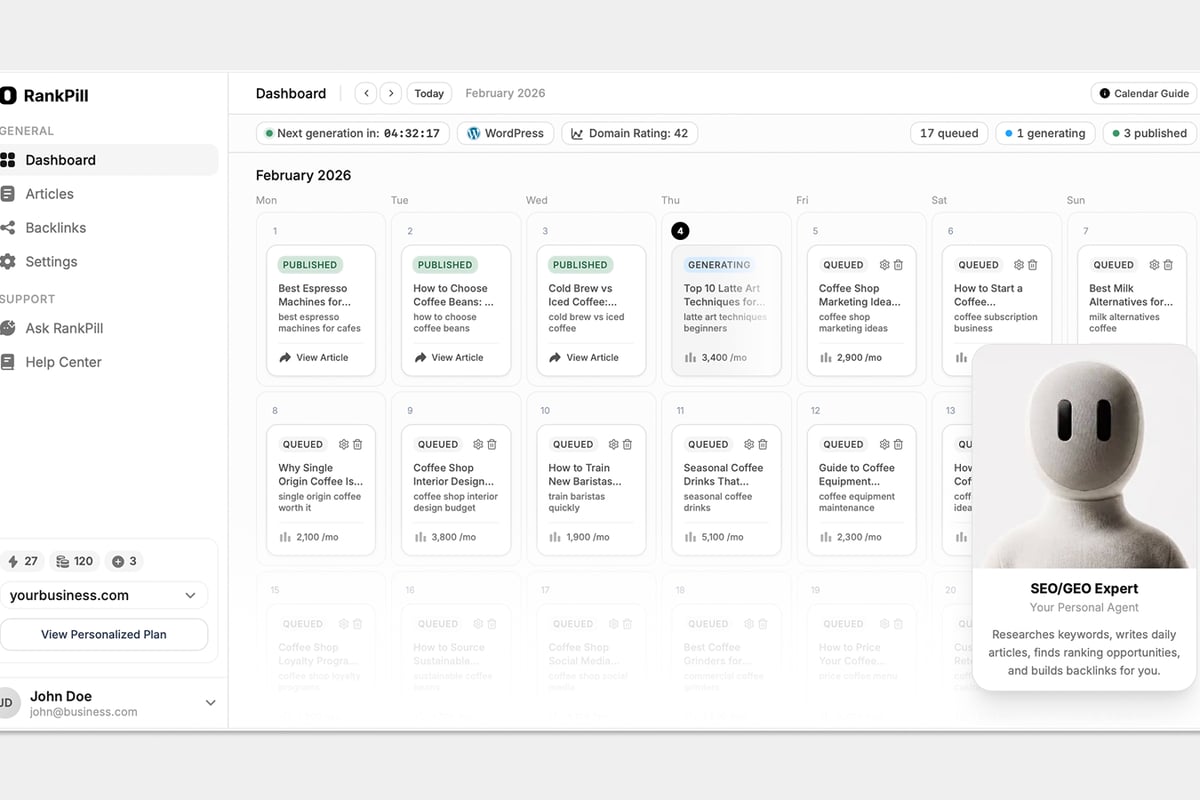
RankPill's built-in keyword research and content calendar already track published articles, their target keywords, and ranking progress. You queue an article, it publishes daily, and the dashboard shows ranking movement without manual exports.
Integrating Monitoring into Your Workflow
Automated seo monitoring fails if alerts pile up unread. Integrate checks into your existing workflow so data drives decisions instead of sitting in dashboards.
Weekly review cadence:
- Monday morning: Review last week's traffic summary, ranking changes, and new backlinks
- Mid-week check: Scan for critical alerts (indexing drops, site-wide errors)
- Friday afternoon: Review content performance and queue new articles based on ranking gaps
Monthly deep dive:
- Compare month-over-month traffic and conversion trends
- Audit top 20 landing pages for optimization opportunities
- Review backlink profile and disavow toxic links if needed
- Run a full-site crawl and fix accumulated technical issues
Quarterly strategy session:
- Assess keyword portfolio: which clusters grew, which stalled
- Benchmark against competitors (rank overlap, content gaps, backlink velocity)
- Adjust content plan and internal linking based on what's working
Set Slack or email alerts for critical issues only. A 50% traffic drop or site-wide indexing failure deserves an immediate ping. A 2-position ranking drop on a single keyword does not. Over-alerting trains you to ignore notifications.
Common Pitfalls and How to Avoid Them
Automation removes manual work, but it introduces new failure modes.
Pitfall 1: Noisy alerts
Alert on every 1-position ranking fluctuation and you'll ignore the system within a week. Set thresholds based on historical variance. If your rank for "marketing automation" normally swings between position 8 and 12, only alert if it drops below 15.
Pitfall 2: Monitoring the wrong metrics
Tracking 500 keywords sounds thorough. If 450 of them drive zero traffic, you're wasting cycles. Focus on the 50 keywords that generate 80% of your search traffic. Add new terms when you publish content targeting them, remove old terms that no longer matter.
Pitfall 3: No context for changes
A ranking drop on March 15 means nothing without knowing Google shipped a core update on March 12, or you deployed a site redesign on March 14. Log every site change (content publish, CMS update, server migration) in a shared calendar and cross-reference it with monitoring data.
Pitfall 4: Ignoring mobile vs desktop splits
Google indexes mobile-first. A page that ranks position 5 on desktop and position 22 on mobile is failing most users. Split your rank tracking by device, monitor Core Web Vitals separately for mobile, and prioritize mobile UX fixes.
Pitfall 5: Forgetting about international and multi-language sites
If you run SEO in multiple countries or languages, each market needs its own monitoring. Google.de rankings differ from Google.com. A tool like RankPill's multi-language SEO runs separate projects per language with local keyword research and rank tracking. Automate reports for each region and compare growth rates across markets.
Advanced Automation: Predictive Alerts and Anomaly Detection
Basic monitoring is reactive: it tells you something broke. Advanced setups predict issues before they hurt traffic.
Anomaly detection uses historical data to flag unusual patterns. If your average daily organic sessions are 1,200 ± 150, and today you see 800, an anomaly detector alerts you even though 800 isn't technically "bad." It's unusual for your baseline.
Google Analytics 4 includes built-in anomaly detection in explorations. BigQuery and Looker Studio can run SQL queries that calculate rolling averages and standard deviations, then alert when today's value falls outside two standard deviations.
Predictive ranking alerts estimate when a page might drop below the fold. If your position trend is declining at 0.5 spots per week and you're currently at position 8, you'll hit position 11 in six weeks. An alert fires now, giving you time to update the content before the drop happens.
This requires more sophisticated tooling (Python scripts with pandas, time-series forecasting, or commercial platforms like Botify). Most small teams won't build it. The concept matters: proactive monitoring beats reactive fixes.
Scaling Monitoring Across Teams and Clients
Agencies and multi-brand companies need per-client or per-site monitoring without rebuilding the stack 50 times.
Use template dashboards: Build one Looker Studio template with all metrics, then duplicate it per client and swap the data source (different Search Console property, different GA4 stream).
Centralize API calls: One script pulls data for all clients, tags it with a client ID, and writes it to a shared database. Each client's dashboard queries only their rows.
Set client-specific thresholds: A local business with 200 monthly sessions has different alert thresholds than an ecommerce site with 50,000. Store threshold rules in a config file or database table per client.
Automate client reporting: Generate PDFs or slide decks monthly showing traffic trends, ranking wins, and issues fixed. Tools like Supermetrics or Databox connect to Search Console and GA4, then export branded reports on a schedule.
If you manage 10+ sites, the setup cost pays off within a quarter. You spend one afternoon configuring a new client, then the system runs for months.
Automated seo monitoring turns hours of manual checks into background tasks that alert you only when action is needed. Set it up once, adjust thresholds as your site grows, and spend your time writing content and building links instead of refreshing dashboards. RankPill handles the content side of that equation, publishing one SEO-optimized article daily with keyword research, internal and external links, and auto-publishing to your CMS, so your monitoring dashboards show steady growth without hiring writers or running a content agency.
Unlock Traffic on Autopilot
Grow organic traffic on autopilot. RankPill will research, write, optimize, and publish articles to your website daily.
 WordPress