
How to Find Backlinks in Google (2026 Guide)

Modest Mitkus · November 6, 2026
Most founders want to know who's linking to their site. You can find backlinks in Google through Search Console, but Google removed the link: operator from regular search years ago. That means the free methods have limits, and you'll need a mix of Google's own tools plus third-party services to see your full backlink profile.
This guide shows you exactly how to find backlinks in Google Search Console, what the old search operators still reveal, and which paid tools give you the complete picture. We'll also cover how to use backlink data to grow traffic without a full-time SEO team.
Why You Need to Track Your Backlinks
Backlinks remain one of the top three ranking factors. Google uses them to measure authority and trust. A link from a site with high domain authority tells Google your content is worth citing.
Tracking backlinks helps you:
- Spot new links as they appear
- Identify which content earns the most links
- Find broken or lost links
- Monitor competitor strategies
- Discover link-building opportunities in your niche
But Google doesn't make it easy. The company deprecated the link: operator years ago, and the data it returns today is incomplete and unreliable. You need to combine multiple sources to get accurate numbers.

How to Find Backlinks in Google Search Console
Google Search Console is the best free source. It shows every backlink Google has indexed for your verified site. The data comes straight from Google's index, so it's authoritative.
Set Up Search Console
If you haven't verified your site yet, follow Google's official setup guide. You'll need to add a DNS record, upload an HTML file, or connect through Google Analytics. Verification takes a few minutes.
Once verified, Google starts tracking backlinks immediately. Historical data appears within a few days.
Access the Links Report
Step-by-step:
- Log in to Search Console
- Select your property from the dropdown
- Click "Links" in the left sidebar
- Review the three main sections: Top linking sites, Top linked pages, Top linking text
The report shows total external links, total linking domains, and a sample of anchor text. Click "More" under any section to export the full list as a CSV or Google Sheet.
Read the Data
Top linking sites lists domains ranked by the number of links they send you. A single domain might link from dozens of pages. Focus on the domain count, not the total link count, because 100 links from one site carry less weight than 10 links from 10 different domains.
Top linked pages shows which URLs on your site earn the most backlinks. If a blog post has 50 links and your homepage has 5, that post is your link magnet. Write more content on that topic.
Top linking text reveals the anchor text people use when they link to you. If most anchors are branded (your company name), you're missing keyword-rich links. If most are exact-match keywords, you might risk an over-optimization penalty.
Export and Monitor
Export the full links report every month. Track new links, lost links, and changes in anchor text distribution. You can set up email alerts in Search Console, but they only notify you of critical issues, not new backlinks.
Store each export in a folder and compare month-over-month. A sudden drop in linking domains signals a problem (links removed, site went offline, or Google deindexed a linking page). A spike means a piece of content went viral or you earned a placement on a high-authority site.
Using Google Search Operators to Spot Backlinks
Google removed the link: operator from public search results, but a few alternative operators can help you discover mentions and potential links. These methods won't show you a complete backlink list, but they're useful for manual prospecting.
The Inurl and Site Operators
Search for mentions of your brand or domain on specific sites. For example:
site:reddit.com "YourBrand"inurl:forum "YourDomain.com"
This finds pages on Reddit or forums that mention your brand. Some might already link to you; others are link-building opportunities. Reach out and ask if they'll add a link.
Kinsta's guide to Google search operators covers dozens of operator combinations. Use intitle:, inurl:, and site: together to narrow results by industry, topic, or content type.
The Minus Operator for Filtering
Exclude your own domain to find third-party mentions:
"YourBrand" -site:yourdomain.com
This reveals blog posts, news articles, and directory listings that mention you but might not link. Manual outreach turns mentions into backlinks.
Related Operator for Competitor Research
Type related:competitor.com to see sites Google considers similar. Visit each one and check if they link to competitors but not to you. If they run a resources page or link roundup, pitch your content.
These operators have limits. Google updates search behavior frequently, and operator results are often incomplete. Treat them as a supplement to Search Console, not a replacement.

Third-Party Tools That Find Backlinks in Google's Index
Google Search Console shows links Google has indexed, but it doesn't show domain authority, spam score, or anchor text diversity in a user-friendly way. Third-party tools crawl the web and build their own link indexes. They offer deeper analysis and competitor insights.
| Tool | Index Size | Free Tier | Best For |
|---|---|---|---|
| Ahrefs | 400B+ links | No | Largest index, competitive analysis |
| Semrush | 300B+ links | Limited | All-in-one SEO and link audits |
| Moz | 40B+ links | Limited | Domain Authority metric |
| Majestic | 200B+ links | Limited | Trust Flow and topical relevance |
Ahrefs Site Explorer
Ahrefs crawls the web constantly and updates its index every 15 minutes. Enter your domain, and you'll see total backlinks, referring domains, Domain Rating (DR), and organic traffic estimates.
What it shows you:
- New and lost backlinks by day
- Anchor text distribution
- Link type (dofollow vs. nofollow)
- Referring page and target URL
- Traffic and DR of each linking domain
Ahrefs also flags spam links and identifies link exchanges or paid placements based on patterns. Use the "Best by links" report to find your highest-authority backlinks, then replicate the content format that earned them.
Semrush Backlink Analytics
Semrush covers backlinks plus keyword rankings and site audits. The backlink module shows referring domains, total backlinks, and Authority Score (Semrush's version of DR).
Filter by link type, anchor text, or country. The "Backlink Gap" tool compares your link profile to three competitors and highlights domains that link to them but not to you. Reach out to those domains with relevant content.
Moz Link Explorer
Moz invented Domain Authority (DA), the metric many marketers still use to judge link value. Link Explorer shows total links, linking domains, DA, and spam score.
The free tier allows 10 queries per month. Paid plans unlock link filtering, anchor text analysis, and link tracking. Moz's spam score is helpful if you're auditing your backlink profile and want to disavow toxic links.
When to Pay for a Tool
If you're publishing content daily and actively building links, a paid tool saves time. Ahrefs and Semrush cost $100 to $200 per month. If you only check backlinks once a quarter, stick with Google Search Console and the free tiers.
For startups building SEO traction, a backlink tool becomes worthwhile once you have 50+ referring domains and need to monitor growth at scale.
How to Build Backlinks Without Cold Outreach
Finding backlinks is half the job. The other half is earning new ones. Cold outreach works, but it's slow and has a low success rate. Here are three faster methods.
Create Link-Worthy Content
Write the best resource on a specific topic in your niche. Long-form guides, original research, and data studies earn links naturally. A 3,000-word guide with charts and examples gets shared more than a 500-word blog post.
Focus on topics where existing top-10 results are thin or outdated. Fill the gap, and others will cite you.
Use a Backlink Exchange
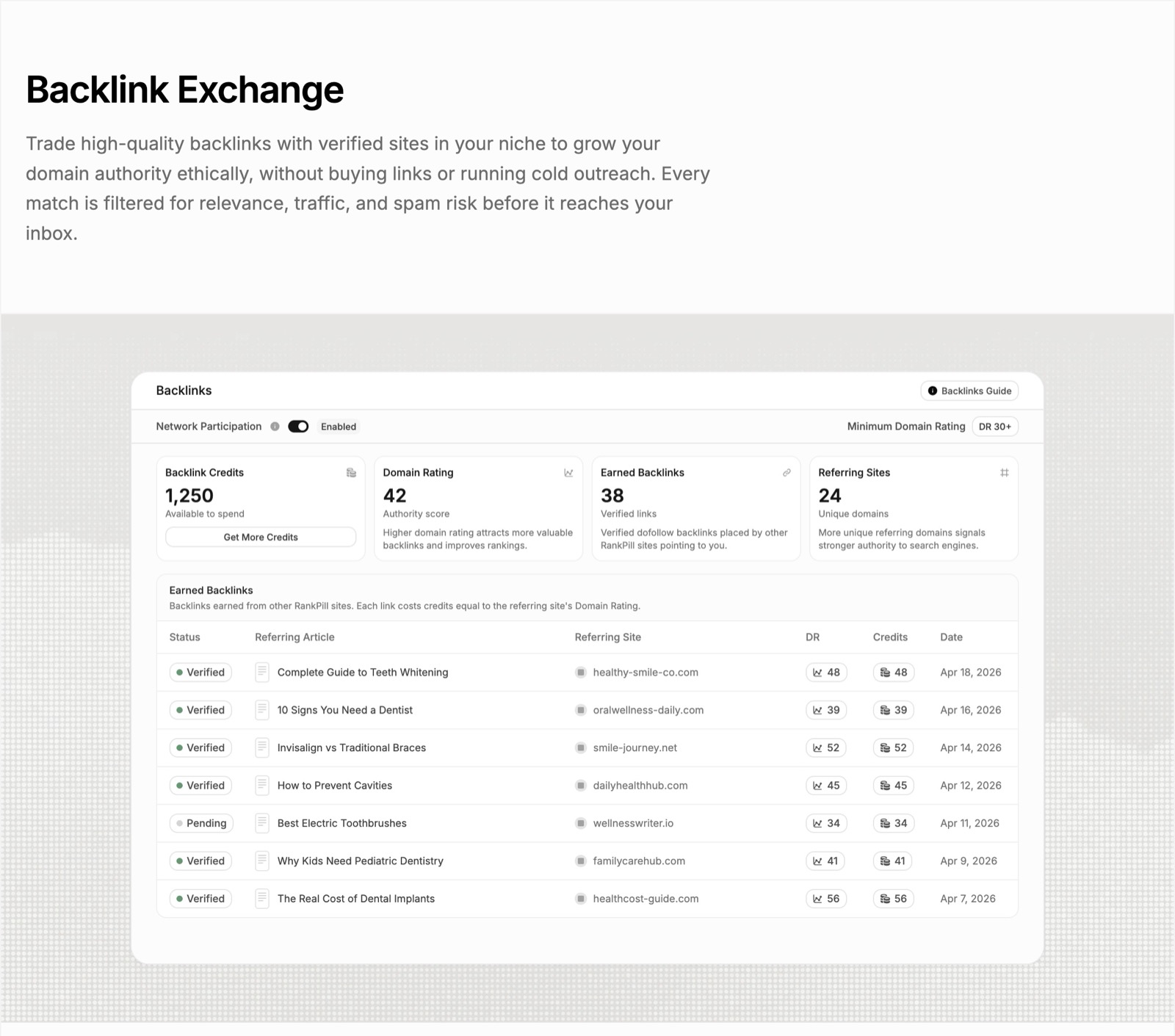
A backlink exchange matches your site with other verified sites in your niche and trades links. Both parties benefit, and the links are contextual and relevant. RankPill's backlink exchange filters matches by Domain Rating, traffic, and niche, so you're not paired with spam sites. Every RankPill plan includes 30 backlink credits per month, and each earned link costs credits equal to the referring site's DR. It's a white-hat way to build authority without cold emails.
Guest Post on High-Authority Blogs
Pitch guest posts to blogs that already rank for your target keywords. Include a link back to a relevant resource on your site. Most editors accept guest posts if the content is original and valuable to their audience.
Use Google search operators to find blogs that accept guest posts:
site:yourindustry.com "write for us"intitle:"guest post guidelines" yourtopic
Send a pitch with three topic ideas and links to your previous work. Follow up once if you don't hear back in a week.
Common Mistakes When You Find Backlinks in Google
Even with the right tools, most founders misread backlink data. Here are the mistakes that waste time and skew your strategy.
Counting Total Links Instead of Referring Domains
A single site might link to you 100 times (site-wide footer links, for example). That counts as 100 backlinks but only one referring domain. Google weighs diversity more than volume. Ten links from ten different domains beat 100 links from one domain.
Always filter reports by unique referring domains, not total backlinks.
Ignoring Anchor Text Distribution
If 90% of your backlinks use exact-match anchor text (your target keyword), Google may flag your link profile as manipulative. Natural backlinks use a mix of branded, URL, and descriptive anchors.
Check your anchor text report in Search Console or Ahrefs. Aim for:
- 40-50% branded anchors (your company or product name)
- 20-30% URL anchors (naked links like yourdomain.com)
- 10-20% exact-match keyword anchors
- 10-20% generic anchors ("click here", "read more")
If your profile is skewed, adjust your link-building strategy. Ask new partners to use branded or URL anchors instead of exact-match keywords.
Treating All Backlinks Equally
A link from a DA 80 news site is worth more than 50 links from DA 10 blogs. Focus on earning links from high-authority domains in your niche.
Use Moz DA, Ahrefs DR, or Semrush Authority Score to prioritize outreach targets. A single link from a site with DR 60+ can move your rankings more than a dozen links from low-authority directories.
Not Disavowing Spam Links
Some backlinks hurt you. Links from foreign-language spam sites, link farms, or adult content can trigger a manual penalty. Google's algorithm usually ignores these links, but if your backlink profile is mostly spam, you risk a ranking drop.
Export your full backlink list from Search Console and filter by anchor text, referring domain, and link context. If you see obvious spam (gambling sites, pharma keywords, unrelated niches), add those domains to a disavow file and submit it through Search Console.
Disavow conservatively. Only disavow domains that are clearly spam. Don't disavow a competitor's backlinks just because they rank above you.
How Backlink Data Fits Into Your SEO Strategy
Backlinks don't work in isolation. They support content and technical SEO. Here's how to integrate backlink tracking into your overall strategy.
Monthly backlink audit:
- Export your links from Search Console
- Count new referring domains vs. last month
- Check anchor text distribution
- Identify your top-linked pages
- Flag any spam links for disavowal
Quarterly competitor analysis:
- Pick three competitors who rank for your target keywords
- Run a backlink gap analysis in Ahrefs or Semrush
- Find domains linking to all three competitors but not to you
- Prioritize outreach to those domains
Content and link planning:
- Review which content types earn the most backlinks (guides, case studies, tools)
- Plan your next 10 articles around those formats
- Reach out to sites that linked to similar content and pitch your new piece
For small teams, automating SEO content frees up time to focus on backlinks. Tools that handle keyword research, writing, and publishing let you spend more hours on outreach and relationship-building.

Advanced Techniques for Backlink Discovery
Once you've mastered the basics, these advanced methods uncover hidden link opportunities.
Crawl Your Own Backlinks
If you want full control, download Common Crawl data and run your own link analysis. Common Crawl provides petabytes of web crawl data updated monthly. You can query it for links pointing to your domain.
This approach requires technical skill (SQL or Python) and cloud storage, but it's free and gives you access to the same raw data that tools like Ahrefs use. Most founders skip this and pay for a tool, but if you have engineering resources, it's an option.
Monitor Brand Mentions with Alerts
Set up Google Alerts for your brand name, product name, and key team members. When someone mentions you without linking, reply to the post or email the author and ask if they'll add a link.
Tools like Mention and Brand24 offer more advanced tracking (social media, forums, blogs) and real-time notifications. The free Google Alerts option works fine if you're just starting.
Track Competitor Backlink Velocity
In Ahrefs, check how many new referring domains your competitors gain each month. If they're earning 20 new links per month and you're earning 5, your backlink strategy needs to scale.
Track their most-linked content and replicate the format. If their "State of [Industry] 2026" report earned 100 links, plan your own data study for 2027.
Trade-Offs Between Free and Paid Backlink Tools
Google Search Console is free and authoritative, but it lacks competitive analysis and historical data beyond 16 months. Paid tools cost $100+ per month but show you competitor backlinks, anchor text trends, and link velocity over years.
When to stick with free tools:
- You have fewer than 50 referring domains
- You publish content monthly, not daily
- You're bootstrapped and can manually export and track links
When to pay for a tool:
- You're scaling content and need competitor insights
- You want to track 10+ competitors at once
- You need historical link data to analyze what worked in the past
For most small teams, Search Console plus one paid tool (Ahrefs or Semrush) covers everything. Add a backlink exchange if you want steady link growth without cold outreach.
What to Do After You Find Backlinks in Google
Data without action is noise. Here's what to do once you've exported your backlink list.
Identify your link magnets: Sort your pages by referring domains. The top 3-5 pages are your link magnets. Write more content on those topics and promote it to the same audiences.
Find broken backlinks: Use a tool like Ahrefs to check if any linking pages return a 404. If they do, contact the site owner and suggest they update the link to a live page on your site.
Analyze competitor gaps: Export backlinks for your top three competitors. Filter for domains with DR 40+ that link to at least two competitors but not to you. Pitch those sites with your best content.
Track month-over-month growth: Store your exports in a spreadsheet and compare new vs. lost links each month. If you're losing more links than you're gaining, investigate why (content removed, site redesign, broken pages).
Disavow toxic links: If your backlink profile includes spam, create a disavow file and submit it through Search Console. Only disavow domains that are clearly harmful (foreign-language spam, adult content, link farms).
How Link Building Supports Long-Term Traffic Growth
SEO is a compounding game. Every quality backlink you earn today makes future links easier to get. High-authority sites link to high-authority sites. Once your DA or DR crosses 40, you'll see more organic backlinks and fewer link requests ignored.
Backlinks also stabilize rankings. A page with 20 backlinks will weather algorithm updates better than a page with 2 backlinks. When Google rolls out a core update, sites with strong link profiles usually recover faster.
But link building takes months. You won't see results in week one. Plan for a 6 to 12-month timeline before backlinks move the needle on traffic. Focus on earning 5 to 10 high-quality links per month rather than chasing 100 low-quality links.
Track your progress in Search Console and celebrate small wins. Every new DR 50+ link is progress. Every competitor gap you close is progress. Consistency beats sprints.
Finding backlinks in Google requires a mix of free tools, paid platforms, and manual research. Google Search Console gives you the authoritative list, but third-party tools add competitive insights and historical tracking. Use backlink data to double down on what's working, fix what's broken, and find new link opportunities in your niche. If you want to grow organic traffic without spending every day on outreach, RankPill handles the content pipeline and backlink exchange in the background. It writes and publishes one SEO article to your site every day, builds internal and external links automatically, and matches you with relevant sites for white-hat backlink trades.
Unlock Traffic on Autopilot
Grow organic traffic on autopilot. RankPill will research, write, optimize, and publish articles to your website daily.