
Keyword Extraction Tool: How to Find Terms That Drive Traffic

Modest Mitkus · November 4, 2026
A keyword extraction tool identifies the most important words and phrases in a piece of text. It scans documents, web pages, or datasets and pulls out the terms that best represent the content. These tools are used for SEO research, content tagging, trend analysis, and understanding what topics actually matter in large volumes of text. Some rely on statistical methods like TF-IDF, others use graph-based algorithms, and newer ones apply transformer models trained on millions of documents. The goal is always the same: surface the signal from the noise.
Why You Need Automated Keyword Extraction
Manual keyword research is slow. Reading through hundreds of articles, support tickets, or competitor pages to find common themes takes hours. A keyword extraction tool does this in seconds.
You use these tools when you need to:
- Tag and categorize content at scale (blog posts, product descriptions, support docs)
- Understand what competitors rank for without clicking through 50 pages
- Find trending topics in customer feedback, reviews, or social posts
- Build topic clusters by grouping similar keywords together
- Automate metadata for CMS workflows or content libraries
The output is a ranked list of terms. Each term usually includes a score that indicates relevance or importance. You can then filter by score, group by topic, or queue the top terms for content creation.
The advantage is speed and consistency. A human might tag the same article differently on Monday and Friday. A keyword extraction tool returns the same result every time.

How Keyword Extraction Algorithms Work
Most tools use one of three approaches: statistical, graph-based, or neural. Each has trade-offs in accuracy, speed, and setup complexity.
Statistical Methods (TF-IDF and Variants)
TF-IDF measures how often a term appears in a document compared to how often it appears across all documents in your dataset. Terms that show up frequently in one article but rarely elsewhere score high.
Scikit-learn's TfidfVectorizer is the standard implementation. You feed it a corpus of text, and it returns a matrix of term weights. High weights mean high relevance.
Pros:
- Fast and lightweight
- No training required
- Works well for large datasets
Cons:
- Misses multi-word phrases unless you configure n-grams
- Ignores word order and context
- Performance drops on short documents
Graph-Based Methods (TextRank and YAKE)
Graph-based algorithms treat words as nodes and connections (co-occurrence within a window) as edges. They rank terms by how central they are in the graph. TextRank applies PageRank to text, surfacing terms that other important terms point to.
YAKE! is a newer variant that combines statistical features (position, frequency, context) without requiring a training corpus. It works on single documents and supports multiple languages out of the box.
Pros:
- Captures multi-word keyphrases naturally
- Unsupervised (no labeled data needed)
- Good at finding domain-specific terms
Cons:
- Slower than TF-IDF on very large corpora
- Parameter tuning required for best results
Transformer-Based Methods (BERT and KeyBERT)
Neural models like BERT encode text into dense vectors (embeddings) that capture semantic meaning. KeyBERT compares the embedding of each candidate phrase to the embedding of the full document. Phrases with the highest cosine similarity to the document are ranked as keywords.
This approach understands that "machine learning" and "ML" are related, even if the exact strings differ. It also handles synonyms and context better than statistical methods.
Pros:
- Best semantic understanding
- Finds keywords even if they appear only once
- Handles ambiguity and synonyms
Cons:
- Requires a pretrained model and more compute
- Slower than statistical methods
- Can hallucinate keywords not present in the text if embeddings drift
| Method | Speed | Accuracy | Setup Complexity | Best For |
|---|---|---|---|---|
| TF-IDF | Very fast | Moderate | Low | Large corpora, simple tagging |
| TextRank/YAKE | Moderate | High | Moderate | Single documents, keyphrases |
| BERT/KeyBERT | Slow | Very high | High | Semantic search, small datasets |
Choosing the Right Keyword Extraction Tool
The best tool depends on your workflow and technical setup. Some are API services, others are open-source libraries you run yourself.
Cloud APIs for Production Use
Google Cloud Natural Language API and Microsoft Azure Key Phrase Extraction are managed services. You send text via REST API, and they return entities and keyphrases with salience scores.
These are good if you want zero maintenance and built-in scalability. You pay per request, so cost scales with volume. Both support dozens of languages and handle entity recognition (people, places, organizations) alongside keyword extraction.
Use cloud APIs when:
- You don't want to manage infrastructure
- You need multi-language support
- You're processing unpredictable volumes
Skip them if:
- You process millions of documents (cost adds up)
- You need full control over the algorithm
- Data privacy rules prevent sending text to third parties
Open-Source Libraries for Custom Pipelines
If you run your own extraction pipeline, libraries like KeyBERT, SpaCy, or Gensim give you full control. You can tune parameters, combine multiple algorithms, or fine-tune models on domain-specific text.
KeyBERT is popular for its simplicity. Install it, load a sentence-transformer model, and extract keywords in five lines of Python. You can filter by n-gram range, diversity, or cosine similarity threshold.
When to build your own:
- You have labeled data to fine-tune a model
- You need to extract from proprietary or sensitive documents
- You want to combine extraction with classification or clustering
Trade-offs:
- Requires Python knowledge and infrastructure
- Model updates and maintenance are on you
- Startup time (loading models) can be slow

Integrating Keyword Extraction into Your SEO Workflow
A keyword extraction tool is most valuable when it feeds directly into content creation and optimization. Here's how to connect it to your existing process.
Step 1: Build a Keyword Library
Run your tool against:
- Your existing articles (to find gaps and clusters)
- Competitor pages that rank for your target topics
- Customer support tickets or sales calls
- Social media threads and community forums
Export the results to a spreadsheet or database. Tag each keyword with search volume and difficulty if your tool supports it. Group related terms into topic clusters.
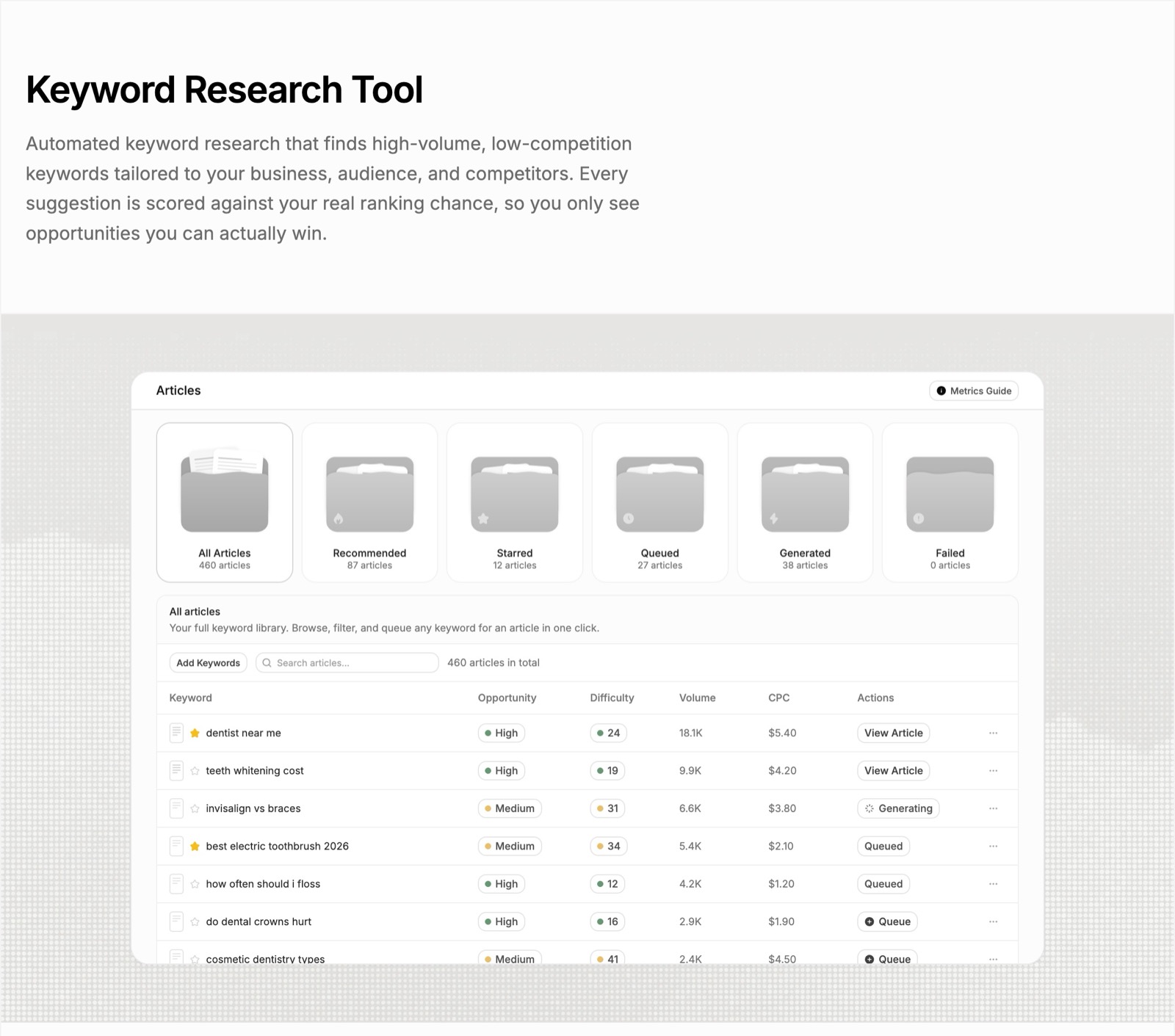
RankPill's keyword research scans your site and competitor domains, then builds a keyword library with real monthly search volume and keyword difficulty from DataForSEO. Every keyword is tagged high, medium, or low opportunity and grouped into topic clusters. You can queue an article for any keyword in one click.
This step turns raw extraction into a prioritized backlog. You now know what to write and in what order.
Step 2: Map Keywords to Content
Match each keyword to an existing page or flag it for a new article. If you already rank on page two for a term, update that page. If you have no coverage, queue it for creation.
Use internal linking to connect related keywords. If your extraction tool found "email automation" and "drip campaigns" in the same cluster, link those articles together. This helps search engines understand your topic depth.
Step 3: Automate Tagging and Metadata
Run extraction on every new article before you publish. Use the top three keywords to populate:
- Meta description
- Image alt text
- Internal link anchor text
- URL slug (if it's a new page)
If you publish to WordPress, Shopify, or Webflow, you can automate this with webhooks. Extract keywords, format them into metadata fields, and send them to your CMS via API. RankPill supports webhooks for custom publishing workflows.
Step 4: Track Performance
Log which keywords you targeted in each article. After 30-60 days, check Google Search Console to see which terms are driving impressions and clicks. If extracted keywords aren't showing up, revisit your content or target different terms.
This feedback loop improves your extraction settings over time. You learn which types of keywords convert and which are just noise.
Common Mistakes and How to Avoid Them
Even good tools produce bad keywords if you don't configure them correctly. Here are the most common issues.
Extracting Too Many Keywords
A tool might return 50 terms for a 1,000-word article. Most of those are filler. Set a threshold (top 5-10 terms) and filter by score. Trying to optimize for every extracted keyword dilutes your content focus.
Ignoring Multi-Word Phrases
Single-word keywords are rarely useful for SEO. "Marketing" is too broad. "Email marketing automation for SaaS" is specific and actionable. Configure your tool to extract 2-4 word n-grams, not just unigrams.
Not Validating Against Search Volume
An extraction tool finds terms that appear in text. It doesn't tell you if anyone searches for those terms. Always cross-reference with a keyword research tool that shows real search volume. A term can be perfectly extracted but have zero monthly searches.
Using the Same Keyword List for Every Article
Extraction should run per document, not per topic. Each article has unique angles and subtopics. Running extraction once and reusing the same keyword list across 10 articles leads to repetitive, generic content.
Forgetting to Update Extraction Settings
If your tool allows it, tune parameters based on your niche. A tech blog might need higher weight on acronyms and product names. An ecommerce site might prioritize color and size modifiers. Default settings are a starting point, not the end state.
Advanced Use Cases for Founders and Small Teams
Once you have basic extraction working, you can layer it into other workflows.
Competitor Content Gap Analysis
Run a keyword extraction tool on the top 10 ranking pages for a target keyword. Compare the extracted terms to your own article. Any term that appears frequently in competitor content but not yours is a potential gap. Add a section or paragraph covering that term.
A comprehensive survey of keyword extraction methods covers classical statistical, graph-based, and neural approaches used in competitive content analysis and semantic gap detection.
Customer Feedback Mining
Extract keywords from support tickets, product reviews, and NPS survey responses. Group by sentiment if your tool supports it. You'll see which features customers talk about most and which pain points repeat. Use those terms to create FAQ pages, feature explainer posts, or comparison articles.
Automated Topic Clustering
After extracting keywords from 100+ articles, cluster them by semantic similarity. Tools like KeyBERT can output embeddings, which you then cluster with k-means or DBSCAN. Each cluster becomes a topic pillar. You write a cornerstone article for the cluster and link all related pieces to it.
This is how large content operations scale. Instead of manually organizing 500 posts, you let the extraction tool find the natural groupings.
Multi-Language Content Expansion
If you serve multiple markets, run extraction in each language separately. Don't translate keywords. Extract directly from native content in that language. RankPill writes and publishes SEO articles in 40+ languages. Each language runs as its own project with its own keyword research and local search volume.
Evaluating Keyword Extraction Quality
Not all extracted keywords are useful. You need a way to measure quality before you build workflows around the output.
Researchers use precision, recall, and F1 score by comparing extracted keywords to a gold standard set (usually author-assigned keywords). The PubMed AKE benchmark covers datasets, evaluation metrics, and experimental baselines for keyword extraction systems.
For practical SEO use, you care about:
- Relevance: Does the keyword match the article's main topic?
- Searchability: Do people actually search for this term?
- Specificity: Is it narrow enough to rank for, or too broad?
Run a sample of 20-30 articles through your tool. Manually review the top 5 keywords for each. If more than 70% are relevant and searchable, your settings are good. If not, adjust your n-gram range, score threshold, or stopword list.
| Metric | What It Measures | Good Threshold |
|---|---|---|
| Precision | % of extracted keywords that are correct | > 70% |
| Recall | % of correct keywords that were extracted | > 50% |
| F1 Score | Harmonic mean of precision and recall | > 0.6 |
You can also A/B test extraction methods. Run TF-IDF and KeyBERT on the same corpus. Queue articles for both keyword sets. After 60 days, compare which set drove more organic traffic. The winner becomes your default.
When a Keyword Extraction Tool Isn't Enough
Extraction finds terms in existing text. It doesn't tell you what to write next. For that, you need keyword research that starts with search volume and competition data, not document analysis.
If you're launching a new site or entering a new niche, you don't have content to extract from yet. Start with a traditional keyword research tool that shows monthly searches, keyword difficulty, and SERP features. Once you have 10-20 articles published, layer in extraction to find gaps and refine your clusters.
Extraction also struggles with emerging topics. If a term just started trending this week, it won't appear in your historical content. You need real-time trend tools or social listening to catch those early.
Finally, extraction doesn't replace editorial judgment. A tool might surface "cheap" or "discount" as top keywords, but if you're positioning as a premium brand, you skip those terms. Algorithms find patterns. You decide strategy.
A keyword extraction tool helps you find the terms that matter in your content, competitor pages, and customer feedback. The best approach depends on your technical setup and how much control you need over the algorithm. Once extraction is working, connect it to your content calendar, metadata workflows, and internal linking strategy to get the most value. RankPill automates the full SEO content pipeline: it finds keywords your site can rank for, writes 3,000+ word articles with images and internal links, publishes one to your website every day, and builds backlinks through its backlink exchange. Built for founders and small teams who want steady organic growth without hiring writers or an agency.
Unlock Traffic on Autopilot
Grow organic traffic on autopilot. RankPill will research, write, optimize, and publish articles to your website daily.
 WordPress