
Guide to Target Keywords for Your Website's SEO

Modest Mitkus · November 19, 2026
Target keywords are the specific search phrases you want a page on your website to rank for in Google. You pick one main phrase per page, write the page to answer what people who type it want, and then measure whether that page earns impressions and clicks. This guide shows you how to choose them, assign them and check whether they work.
What Are Target Keywords?
Target keywords are the search terms a page is built around. If someone types "accounting software for freelancers" into Google and you sell that product, that phrase is a keyword you could aim a page at.
A page usually has one primary phrase and a handful of related ones. The primary phrase goes in the title, the main heading and the first paragraph. The related phrases show up naturally as you cover the topic.
Here is a simple example. Say you run a bike repair shop.
- Primary phrase: "bike tune-up cost"
- Related phrases: "how much does a bike tune up cost," "bike service price," "basic vs full tune-up"
- Page: one article that answers the cost question with real price ranges
You do not need ten pages for those four phrases. One good page can cover all of them. Ahrefs recommends grouping keyword ideas by parent topic, search intent and business value, and notes that related terms can sometimes be targeted with a single page.
How to Find the Best Keywords for Your Site
The best keywords are the ones your site can realistically rank for and that bring people who might buy. To find them, start from what you sell, then widen out using real search data.
Work through these steps:
- List your offers. Write down each product or service in plain words a customer would use.
- Write the questions customers ask. Sales calls, support emails and Reddit threads are good sources.
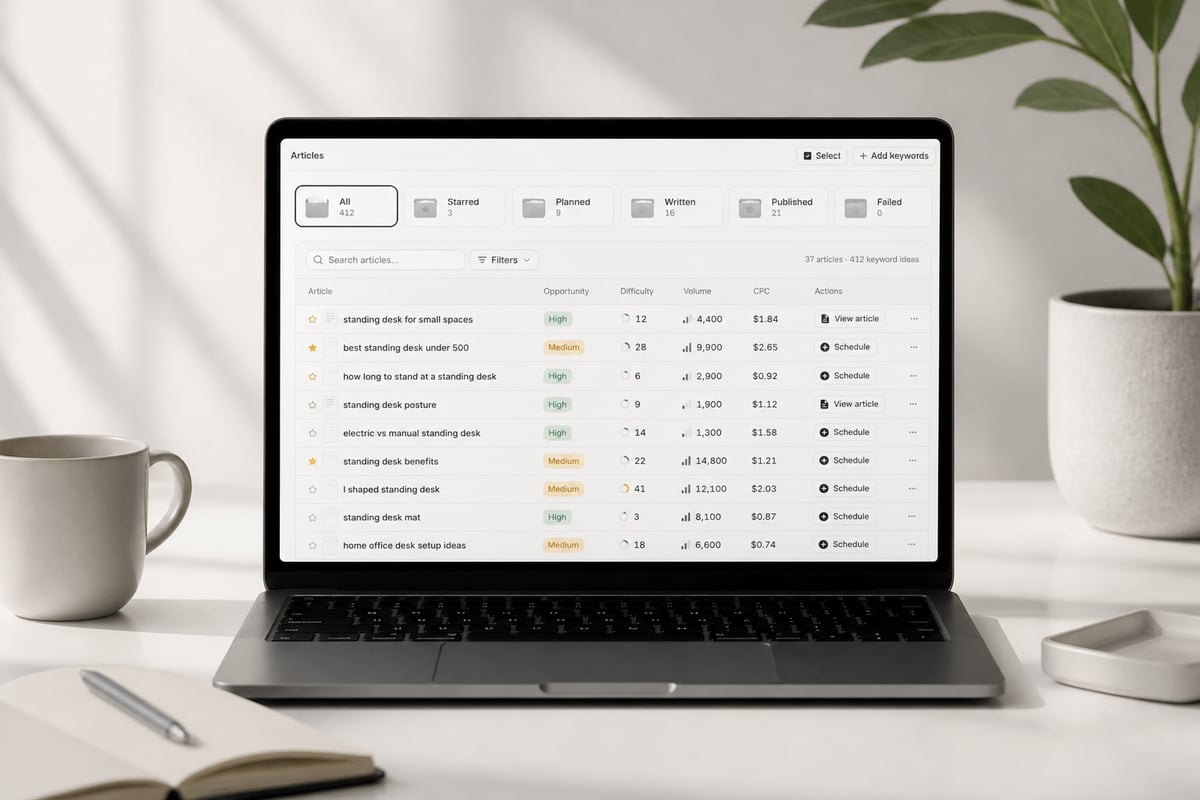
- Expand with a research tool. Feed your seed phrases into a keyword tool to see volume and difficulty.
- Check what already ranks. Search each phrase and read page one.
- Pick a short list. Choose 10 to 20 phrases you can write for this quarter.
You can also pull ideas from rivals. Look at the pages competitors already rank for and ask which ones fit your business. Our walkthrough on how to get competitor keywords covers that process step by step, and the related keywords finder is a quick way to widen a seed phrase.
If you would rather skip the spreadsheet, the Keyword Research Tool from RankPill scans your website and your competitors, then builds a list with real monthly search volume and keyword difficulty. Each keyword is tagged by opportunity.
Match Search Intent Before You Match Words
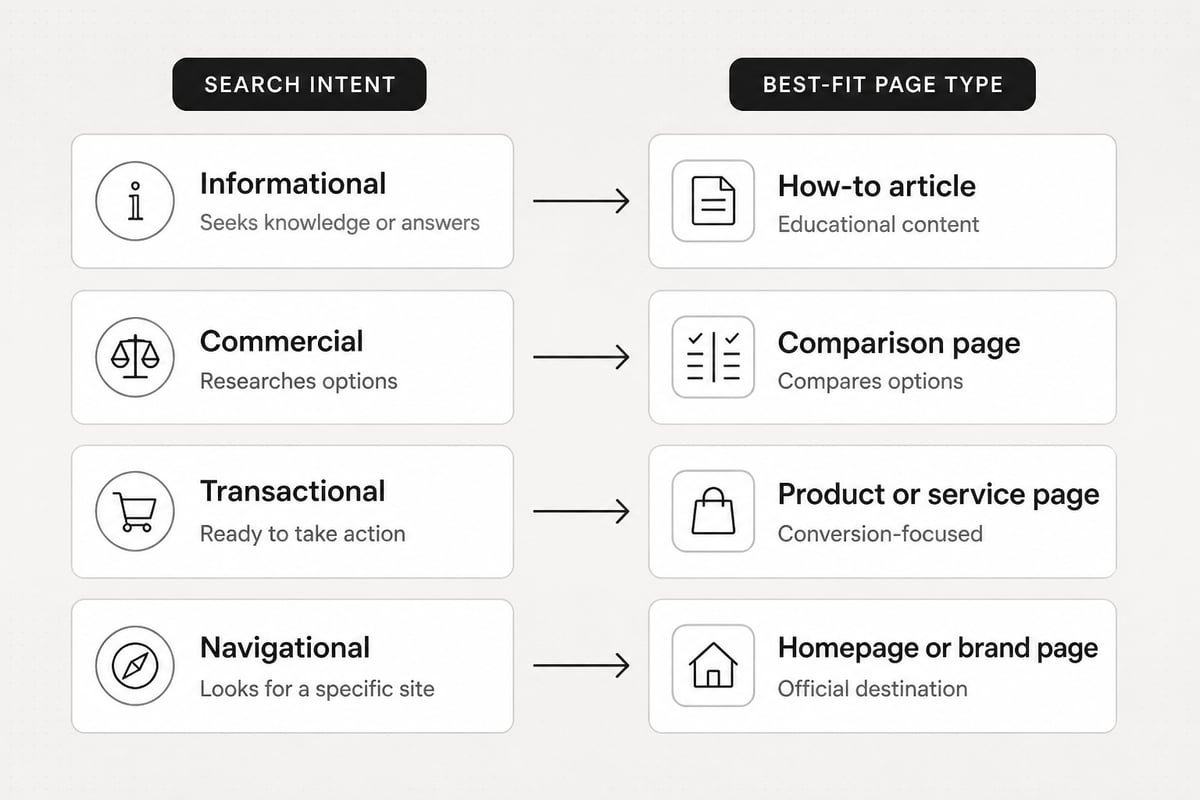
A keyword only works if your page gives searchers what they came for. Search intent is the reason behind a query, and Google will rank pages that fit it even when another page uses the exact words better.
There are four common types:
- Informational: "what is a keyword gap" (the searcher wants an explanation)
- Commercial: "best invoicing tools for small business" (the searcher is comparing options)
- Transactional: "buy standing desk" (the searcher is ready to purchase)
- Navigational: "RankPill login" (the searcher wants a specific site)
Test intent by searching the phrase yourself. If page one is full of how-to guides and you have a product page, you will struggle. If page one is full of product pages and you wrote a 2,000-word explainer, same problem.
Small businesses often get this wrong with their own service pages. A plumber who writes a long article for "emergency plumber near me" is fighting a local, transactional query with an informational page. A short page with a phone number, service area and prices fits better.
How to Judge Search Volume and Difficulty
Search volume tells you how many people search a phrase, and difficulty tells you how hard it is to rank. Neither number should decide a keyword on its own.
Ahrefs explains that search volume is generally an average monthly count, and in Google Keyword Planner and many SEO tools it is an annual average. Treat it as a rough size, not a promise.
The same source points out that volume alone does not predict traffic. A top-ranking page can pull visits from many related keywords, so a phrase with modest monthly searches may sit inside a topic that sends far more.
A practical way to sort phrases:
| Situation | What it usually means | What to do |
|---|---|---|
| Low volume, low difficulty | Easy win, small audience | Write it early, especially if it is close to a sale |
| Medium volume, medium difficulty | Realistic target for a growing site | Make it a core part of your plan |
| High volume, high difficulty | Dominated by large sites | Come back to it once you have more pages ranking |
| High volume, no buyer intent | Traffic that will not convert | Skip it or cover it lightly |
New sites should lean toward the first two rows. A site with few backlinks rarely beats established brands on a broad head term.
Assign One Target Keyword Per Page
Give each page one primary phrase, and do not give the same phrase to two pages. When two pages chase the same query, they compete with each other, and Google may pick the weaker one.
Build a simple map. A spreadsheet with four columns works:
- Page URL
- Primary phrase
- Secondary phrases
- Intent type
Fill it in for every page you already have before you plan new ones. You will often find two things: pages with no clear phrase at all, and pages fighting over the same one. Fix those first, because it costs nothing and often helps more than writing new content.
Where do the phrases go? Put the primary one in these places:
- The title tag and the page's main heading
- The first paragraph, in a sentence that reads naturally
- One subheading
- The URL, kept short
- The meta description
Do not repeat it in every section. Use plain variations and related terms instead. Google has said its ranking systems prioritize helpful, reliable information created to benefit people, not content made to manipulate rankings. Stuffing a phrase into every paragraph reads badly and does nothing for you.
Apply the 80/20 Rule to Your Keyword List
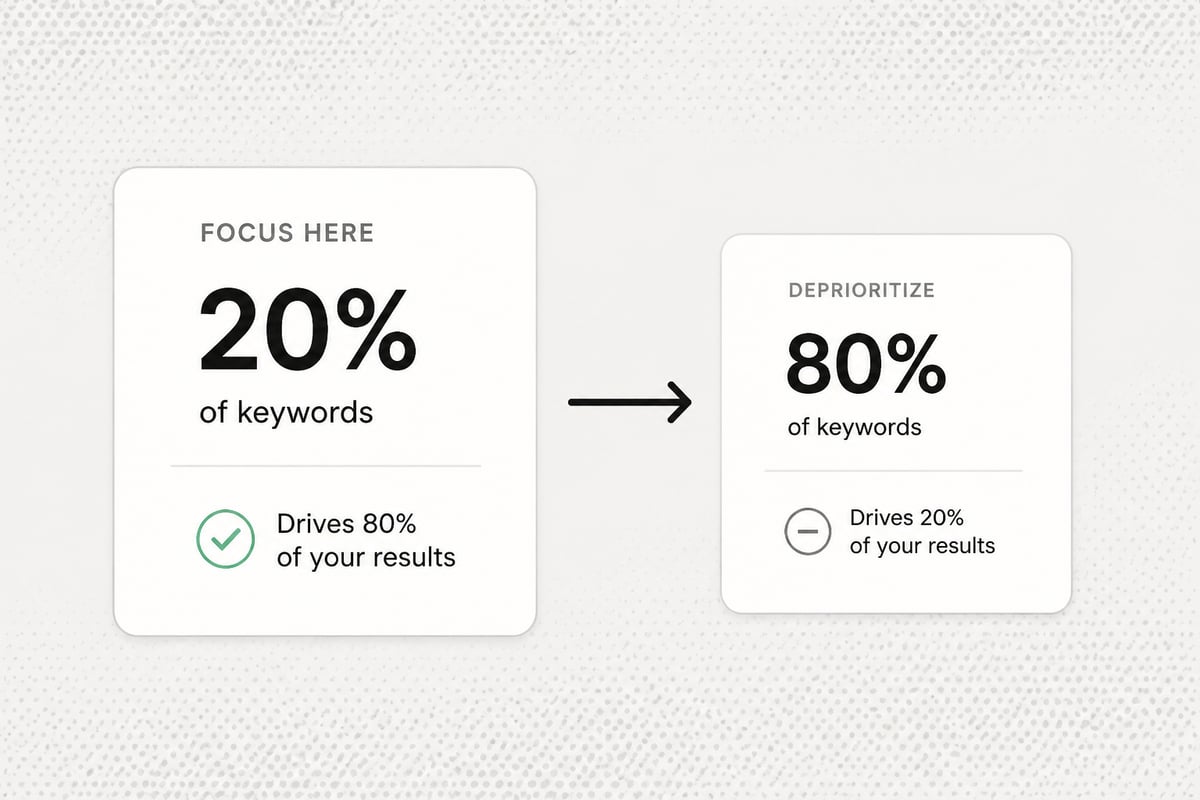
The 80/20 rule in SEO says that a small share of your pages usually produces most of your traffic. In practice, a handful of well-matched pages will bring in most of your clicks, so put your effort where the payoff is.
Here is how to use that idea without overthinking it:
- Pull your top pages from Search Console and see which ones bring in most clicks.
- Look at what those pages have in common: intent, topic, format, length.
- Plan the next batch of target keywords around those patterns.
- Update the pages that sit on page two before writing wholly new ones.
This is also why a bigger keyword list is not always better. Fifty weak, off-topic phrases will not beat ten good ones. Pick the phrases closest to what you sell, and build out from there. For a longer view on building a list you can maintain, see this guide to an SEO keywords list.
Where Target Keywords Fit with AI Search
Clear pages that answer a specific question well can get cited by AI assistants as well as ranked in Google. Your target keywords still matter here, because they tell you which questions your customers ask.
Write each page so a short passage answers the main question directly. Then add the detail, examples and sources below it. This helps a reader skimming the page, and it helps any system pulling an answer from it.
You do not need to rank first on Google to be cited by an AI assistant. A well-sourced page that answers a narrow question can show up even when it ranks lower. If you want to go deeper, our guide to generative engine optimization covers how to structure pages for it.
How to Track Whether Your Keywords Are Working
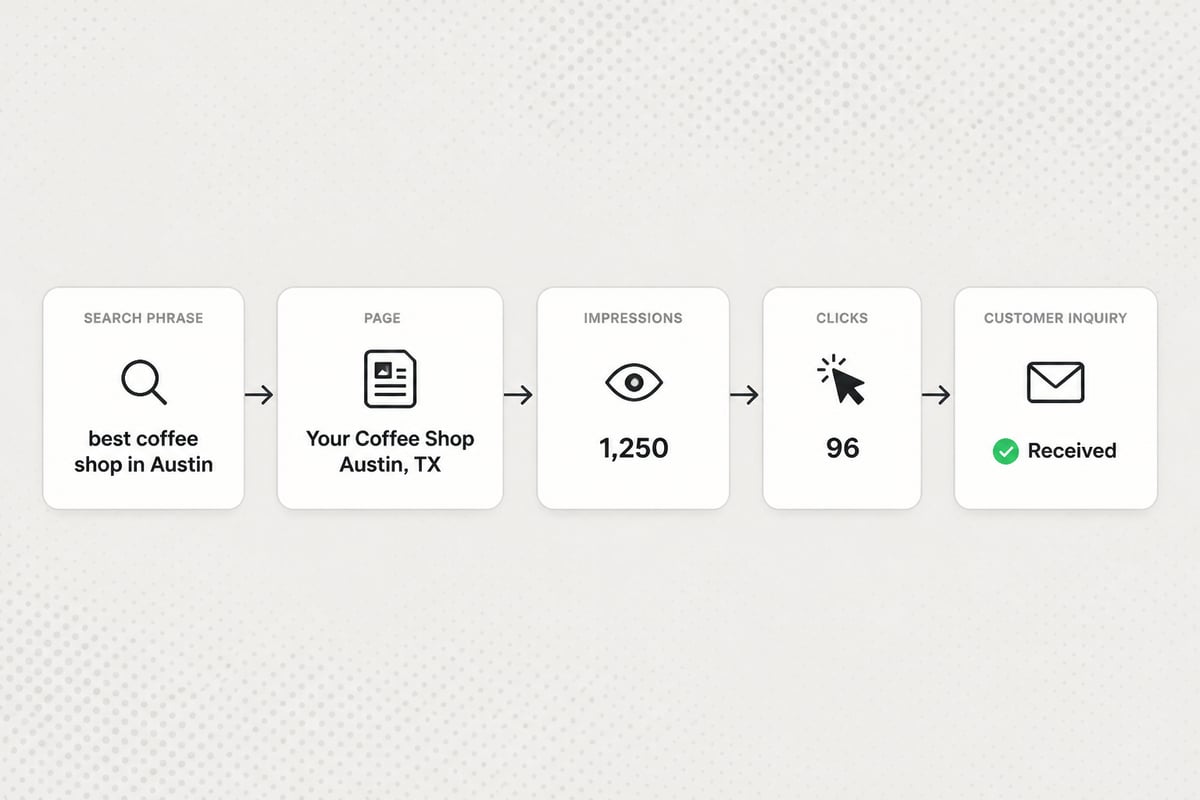
Check Google Search Console, which is free, to see whether your pages are getting impressions and clicks for the phrases you chose. It is the most direct way to confirm a keyword is working.
Google defines impressions as how often a user saw a link to your site on Google, clicks as how often a user clicked one, and average position as the average topmost position of your site's link across impressions. The Performance report adds click-through rate, which is clicks divided by impressions, and by default shows the past three months of data.
Look at these signals for each page:
- Impressions rising, clicks flat: Google shows the page, but the title or description is not drawing clicks. Rewrite them.
- Position between 8 and 20: The page is close. Add depth, improve internal links, or tighten the match to intent.
- Impressions on phrases you did not plan for: Add those phrases as secondary targets, or write a new page for them.
- No impressions after several weeks: Check that the page is indexed, then check intent.
Give it time. Many sites see first impressions within a few weeks, and steady growth often shows over several months as more pages get indexed and rank. That timeline varies by niche and by how established your site is.
Common Mistakes with Target Keywords
Most keyword problems come from a short list of habits. Check your own plan against these:
- Chasing volume. Big numbers attract you, but a phrase with no buying intent brings visitors who do nothing.
- Ignoring page one. If you have not read what ranks, you are guessing at intent.
- Two pages, one phrase. This splits your effort and confuses Google.
- Picking phrases you cannot support. A phrase should match something your business actually offers.
- Writing once and never checking. Review your results every month or two and adjust.
- Forcing exact wording. If the exact phrase makes a sentence awkward, use a natural variation instead.
Keeping Up the Pace on a Small Team
Choosing phrases is the easy part. Writing, linking, adding images and publishing a page for each one is where small teams stall. A list of 30 target keywords can sit untouched for months.
If you have the time and skill, write them yourself and publish weekly. A steady schedule beats occasional bursts. If you do not, an automated tool can plan, write and publish the pages for you. RankPill, for example, finds keywords from your site, your competitors and live search data, writes articles with images, internal and external links and meta tags, and publishes them to WordPress, Shopify, Webflow, Wix, Framer or any site through webhooks. You can set it to hold every article for your approval, or approve the topic plan first, so you stay in control.
It is not the right choice if you only want hand-written content, or if your site cannot connect to a supported publishing platform. In that case, the map-and-schedule method above still works well with a plain spreadsheet.
FAQ
What is an example of targeting a keyword?
Hypothetical example: a local dentist targets a phrase like "teeth whitening cost" by writing one page that explains the price factors, the options and how to book, with the phrase in the title, main heading and first paragraph.
How many target keywords should one page have?
One primary phrase and a few closely related ones. If two phrases need different answers, they belong on separate pages. If a single page can fully answer both, keep them together.
How often should I review my target keywords?
Check Search Console every month or two. Look for pages stuck on page two, phrases you are getting impressions for by accident, and pages that have lost ground. Update those before writing new ones.
Open Google Search Console today, sort your pages by impressions, and write down the one primary phrase each top page should own. That small map tells you where to fix overlaps and what to write next. If you would rather not research, Try RankPill to plan, write and publish articles around your target keywords on a schedule you choose, starting with a 3-day trial for $1.
Unlock Traffic on Autopilot
Grow organic traffic on autopilot. RankPill will research, write, optimize, and publish articles to your website daily.