
AI Product Search Guide for Online Stores

Modest Mitkus · November 18, 2026
AI product search is search that understands what a shopper means, not just the words they type, and returns products that match the intent. It also describes how shoppers now find products through ChatGPT, Gemini and Google AI Overviews before they ever reach your store. This guide covers both sides: how to improve the search box on your site, and how to make your products easy for AI systems to find and cite.
What AI product search actually means
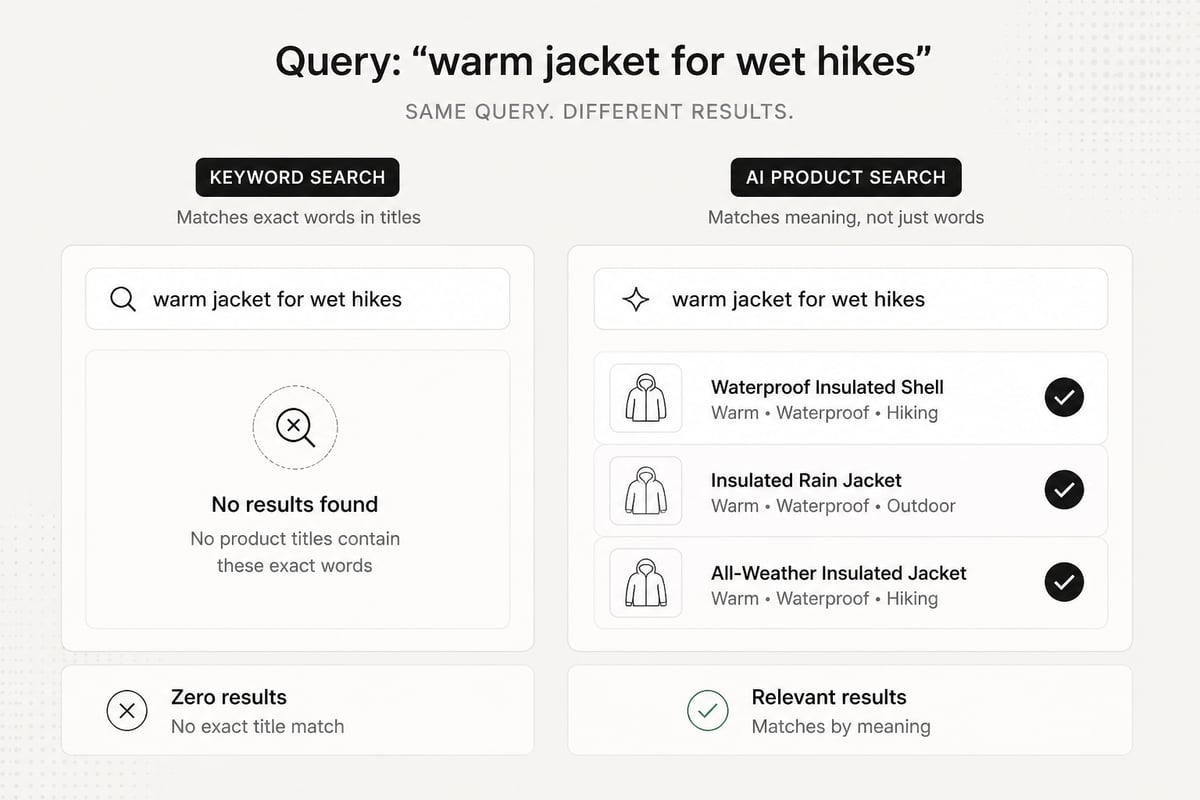
AI product search uses language models and learned ranking to match a query to products by meaning, instead of matching exact keywords. A shopper who types "warm jacket for wet hikes" gets waterproof insulated shells, even if no product title contains those exact words.
Classic store search works differently. It looks for the typed words in titles, descriptions and tags. If the words don't appear, the product doesn't show. This is why "sneakers" can return nothing on a store that only says "trainers."
AI product search changes three things:
- Query understanding. It reads synonyms, typos, vague phrasing and long descriptive queries.
- Matching by meaning. It compares the query to product data using embeddings, which are numeric representations of meaning.
- Ranking by likely fit. It orders results using signals like attributes, availability, popularity and past behavior.
There are two places this plays out for a small store. The first is the search bar on your own site. The second is the outside world: Google, ChatGPT and other assistants that answer product questions and sometimes name specific stores. You need to handle both, and they reward some of the same work.
Why default store search loses sales
Default store search fails often, and shoppers rarely forgive it. Baymard Institute's e-commerce search study tested 19 leading sites across eight retail verticals and found more than 700 search-specific usability issues. These were large sites with real budgets.
Baymard also benchmarked leading US and European e-commerce sites against its search guidelines. The pattern is consistent: the problems are structural, not rare edge cases.
Common failures on small stores include:
- Zero-result pages for reasonable queries
- Synonyms and regional spellings that don't match ("couch" vs "sofa")
- Searches by use case ("gift for a new dad") returning nothing
- Typos treated as unknown words
- Results ordered by date added instead of relevance
- Filters that don't match how people describe products
Baymard's 2024 product-finding research went further. It included qualitative user and site sessions across multiple retail sites and identified more than 1,000 medium-to-severe usability issues. The takeaway for a founder: finding products is a hard problem, and the search box is where it most often breaks.
How AI product search works under the hood
AI product search turns both the query and your catalog into numbers that capture meaning, then finds the closest matches and re-ranks them. You don't need to build this yourself, but you should know the parts so you can judge tools.
- Query parsing. The system cleans the query, fixes typos and pulls out attributes like color, size or price range.
- Embedding. The query and each product (title, description, attributes, sometimes images) become vectors. Similar meanings sit close together.
- Retrieval. The system fetches the nearest products. Many tools combine this with classic keyword matching, called hybrid search, because exact terms like SKUs and model numbers still matter.
- Re-ranking. A second pass orders candidates using business signals: stock, margin, sales velocity, click-through.
- Result presentation. The system may rewrite filters, suggest follow-up refinements or explain why a product fits.
Some tools add conversational search, where a shopper answers a few questions ("What will you use it for?") and gets a short list with reasons. Others add visual search, where an image becomes the query.
The honest trade-off: this is only as good as your product data. If your descriptions are thin and your attributes are blank, a smart engine has nothing to understand. Better data beats a fancier model most of the time.
What to fix in your catalog before buying any tool
Clean product data improves every kind of search, on your site and off it. Do this first, because it costs little and makes any tool work better.
Fill in the attributes shoppers filter by
List the attributes a customer would use to describe the product out loud: material, size, use case, compatibility, who it's for. Put them in structured fields, not buried in a paragraph. Empty fields are the main reason filters feel broken.
Write descriptions in the shopper's words
Add the plain phrases people actually use. If you sell a "softshell," also say "light rain jacket for spring hikes." Use customer emails, reviews and support questions as your source for language.
Standardize names and variants
Pick one name per concept. "Navy," "dark blue" and "midnight" for the same color split your results. Group variants under one parent product so search returns one clear item, not nine near-duplicates.
Add structured data
Structured data is the bridge to the outside world. Google recommends using product-page structured data and, where feasible, a Merchant Center product feed. Google Search Central notes that using both can help Google understand and verify product information. For the markup types involved, see Google's overview of structured data for ecommerce, which covers Product, ProductGroup, BreadcrumbList and Organization.
Most Shopify, WordPress and Webflow stores can output Product markup through the theme or an app. Check yours with Google's Rich Results Test and fix missing price, availability and review fields.
Ways to add AI search to your own store
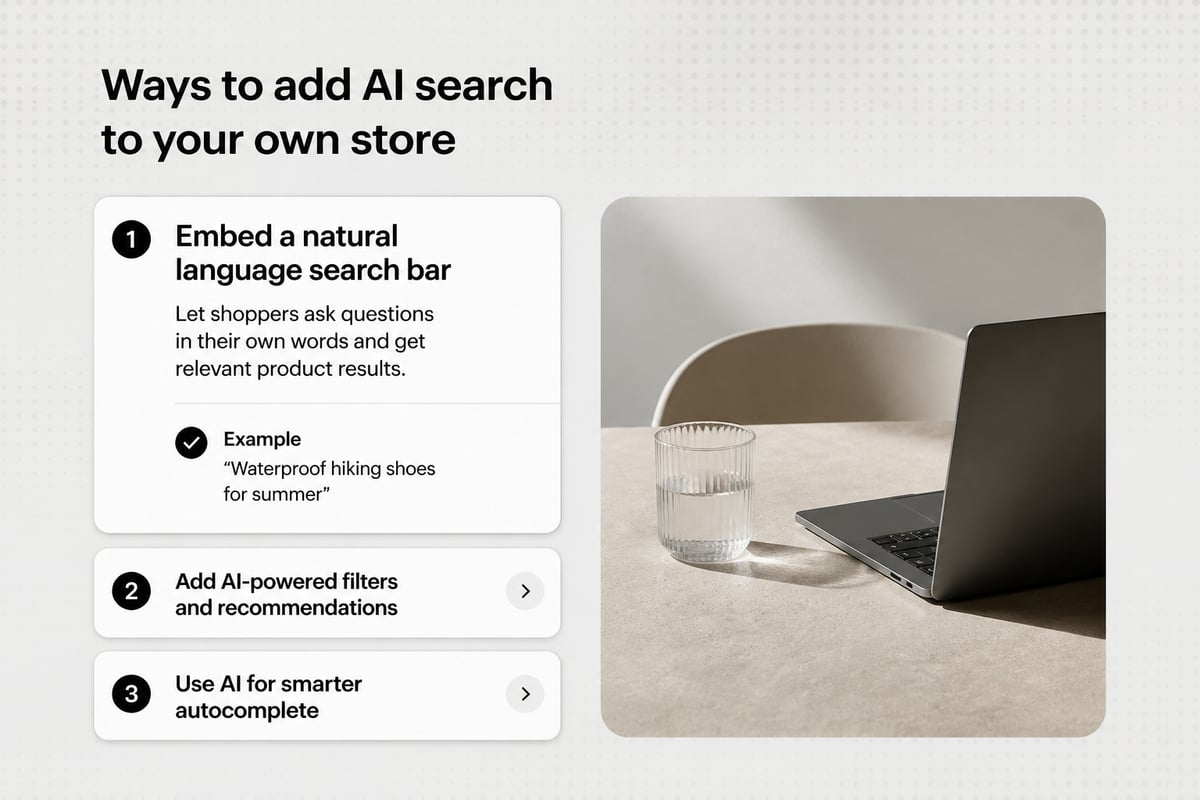
You can add AI product search to your store through a built-in feature, a third-party search app, or a custom build. The right choice depends on catalog size and technical help.
| Option | Typical fit | Main trade-off |
|---|---|---|
| Platform's built-in search | Under a few hundred products, simple catalog | Limited meaning-based matching |
| Third-party search app or plugin | Most small and mid-size stores | Monthly fee, setup and data sync |
| Custom build with embeddings | Large or unusual catalogs, technical team | Engineering time and upkeep |
For most founders, a third-party app is the practical middle. Before you pay, ask these questions:
- Does it handle synonyms and typos without manual rules?
- Does it combine keyword and meaning-based matching?
- Can you see what shoppers searched and which queries returned nothing?
- Can you pin or boost products for key queries?
- How does it sync your catalog, and how often?
- What happens to search if the service goes down?
If your store has 40 products and a simple structure, a search upgrade may not be your best use of money. A tidy catalog and clear navigation can do more. Be honest with yourself about catalog size before you buy.
How to measure whether search is working
Measure search with a few simple numbers you can pull from your analytics or search app. Check them before and after any change.
- Search usage rate. Share of sessions that use the search box.
- Zero-result rate. Share of searches that return nothing. Aim to push this down every month.
- Search conversion rate. Compare orders from sessions with a search against sessions without one.
- Refinement rate. How often shoppers search again right after a first search. High numbers signal weak first results.
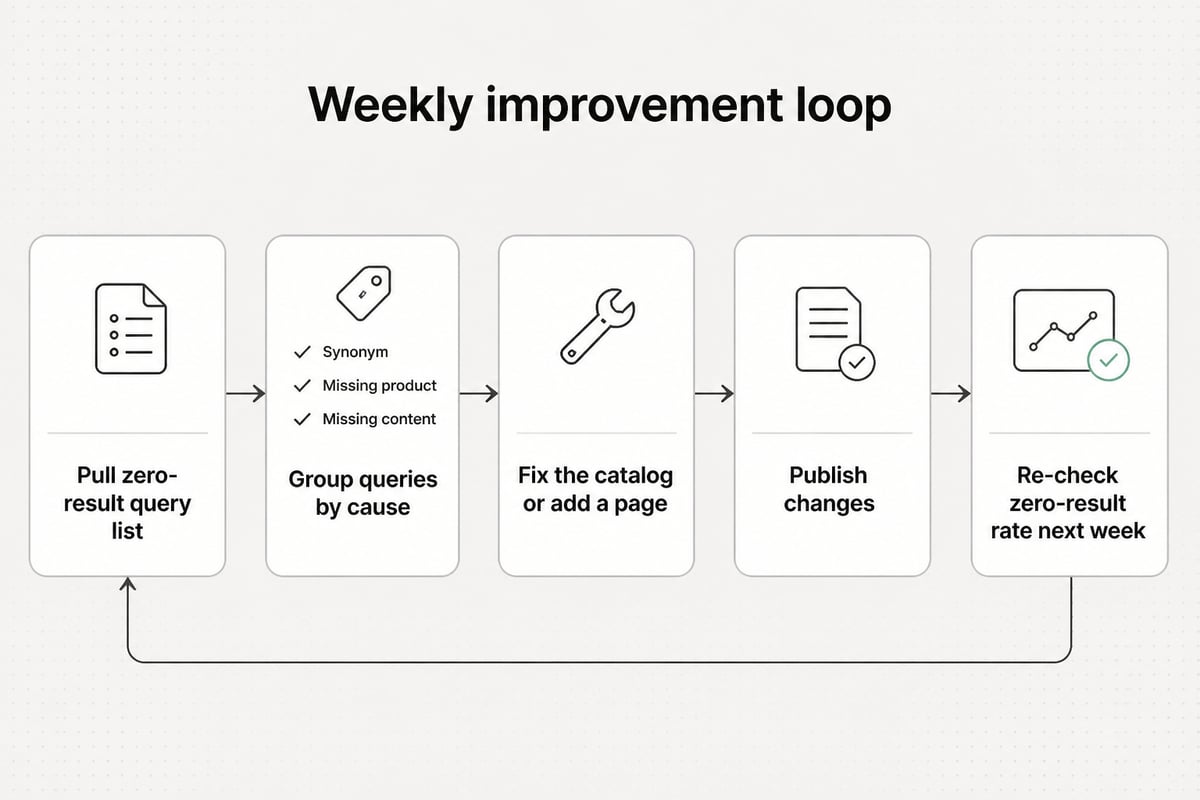
- Top zero-result queries. This list is gold. Each entry is either a synonym to add, a product to stock or a page to write.
Review the zero-result list weekly for the first month. It tells you what your customers call your products, which feeds your product copy and your content plan.
How shoppers find products through AI assistants
Shoppers now ask ChatGPT, Gemini and Google AI Overviews for product advice, and those systems answer from pages on the web. If your pages answer the question clearly, you can be named in the answer.
This is the second meaning of AI product search, and it's open to small stores. You don't need to rank first on Google to be cited. You need pages that state clearly who a product is for, what it does, how it compares and what it costs, with sources where claims need them.
What these systems tend to pull from:
- Buying guides that answer one question well ("How to choose a trail running shoe for wide feet")
- Comparison pages that treat options fairly and state trade-offs
- Product pages with complete specs and structured data
- FAQs written in the plain question format shoppers use
- Pages from sites that are consistently about one subject
If you want the deeper playbook, these RankPill guides cover it: SEO for AI search and AI search optimization. For a view of how assistants find and cite pages, see how ChatGPT search works.
The practical point: your category and product pages are not enough on their own. Assistants answer questions, and your catalog pages rarely contain the questions. Articles do.
Content that feeds both kinds of search
Helpful articles written around the questions shoppers ask serve your site search, Google and AI assistants at once. They also give your store pages internal links to point to.
Start with the questions that sit just before a purchase:
- "What's the best X for Y?" guides tied to your products
- "X vs Y" comparisons for choices you sell
- Sizing, fit, compatibility and care guides
- "How to choose" explainers for expensive or technical products
- Gift guides by recipient and budget
Each article should link to the relevant product and category pages, and name your products where they fit. That helps shoppers move to a purchase and helps search engines understand what you sell.
Finding which questions are worth a page takes keyword research with real volume and difficulty numbers. Your zero-result search list is a free starting point. For method, see these guides on AI keyword research and automating keyword research.
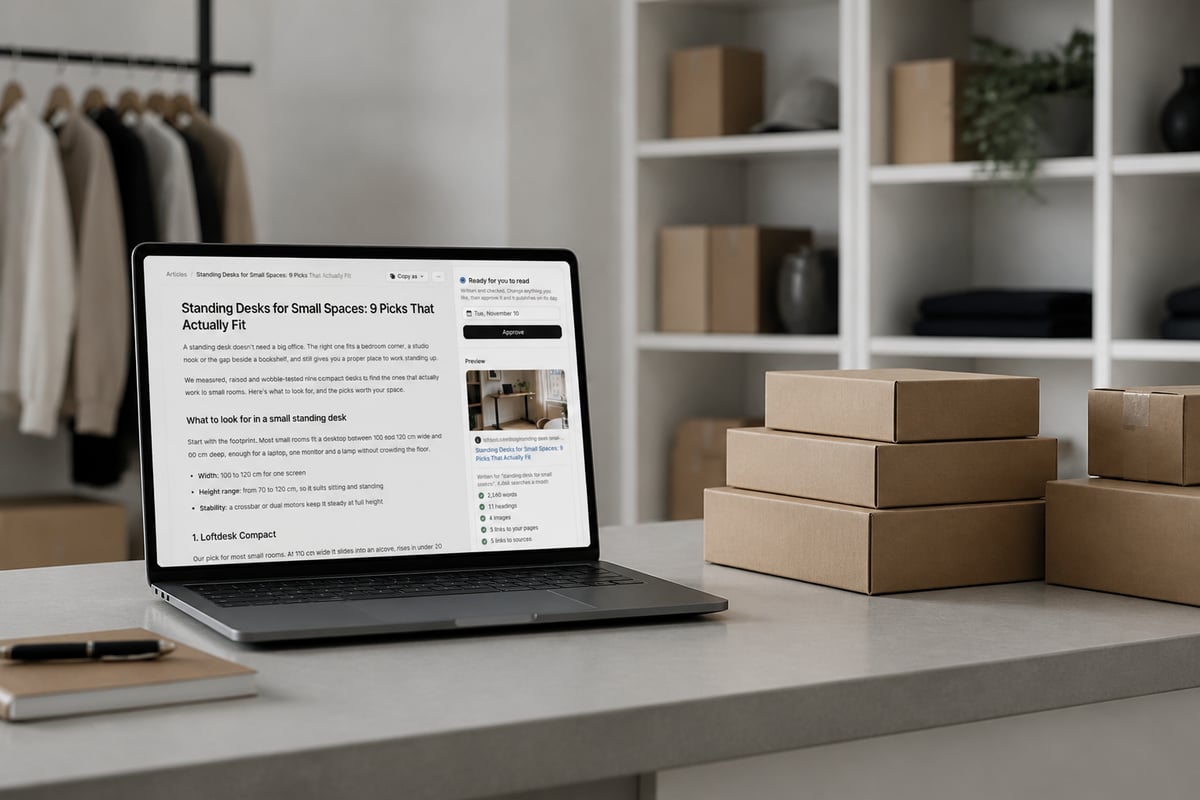
The constraint is time. A store owner running orders, suppliers and ads rarely has hours to research and write 20 buying guides. That's where automation helps. RankPill's SEO Content Writer studies the top results for a keyword, builds an outline that matches search intent and writes an article with cited sources, internal and external links, a meta title and description, and images with alt text. You can edit anything in the editor or let it publish on its own.
If you prefer hand-written content only, this approach is not for you, and that's a fair choice. Just plan for the writing time it takes.
A 30-day plan for a small store
A small store can make real progress on ai product search in 30 days with a few focused steps. Here is a sequence that fits around a normal workload.
Week 1: audit.
- Export your site search queries and zero-result queries.
- Test 20 searches yourself using customer language, typos and use-case phrases.
- Check Product structured data on five key pages.
Week 2: fix the data.
- Fill in missing attributes on your top 50 products.
- Merge duplicate color and size names.
- Rewrite descriptions for your top 10 sellers in shopper language.
- Connect or review your product feed in Google Merchant Center. Google's Merchant Center guidance explains the structured data attributes it expects on product pages.
Week 3: pick the search layer.
- Decide between built-in search, an app or nothing yet, using catalog size and zero-result rate.
- If you add an app, run it on a trial and compare the same 20 test queries.
Week 4: publish answers.
- Choose five buying-guide or comparison topics from your query list.
- Publish them, link them to products, and check Search Console for impressions.
- Set a monthly reminder to review zero-result queries.
You can connect Google Search Console for free to see clicks, impressions and positions. If you run Shopify, this walkthrough on connecting Shopify to Google Search Console shows the setup.
Results take time. Expect first impressions on new articles in a few weeks and steadier growth over several months. AI assistants may pick up clear content sooner, but there is no guaranteed timeline.
Mistakes that waste money
Most failed attempts at AI product search come from a short list of avoidable mistakes.
- Buying a tool before cleaning data. A smart engine on messy data returns messy results.
- Ignoring the zero-result list. It's the cheapest research you'll ever get.
- Over-trusting the demo. Test with your own products and your own customers' phrasing.
- Skipping structured data. Without it, Google and assistants have to guess your price, stock and variants.
- Publishing thin pages. Short, generic articles don't get cited and don't convert. Write for the reader, cite sources and say when a product is not the right fit.
- Treating it as one-time work. Catalogs, queries and AI answers shift. A monthly review keeps you current.
FAQ
How can I find my AI searches?
If you mean your own history in an assistant, open the chat history or activity settings in ChatGPT or Gemini and review past prompts there. If you mean searches on your store, check your site search report or your search app's query log. To see how AI assistants mention your brand, you need tracking that asks the prompts for you, such as RankPill Plus, which checks up to 50 prompts daily in ChatGPT, Gemini and Google AI Overviews.
What are the 7 main types of AI?
A common grouping splits AI by capability (narrow, general, superintelligent) and by function (reactive machines, limited memory, theory of mind, self-aware). Only narrow, limited-memory systems exist today. Product search uses narrow AI: language models and ranking models trained for one task.
Does AI product search replace keyword research?
No. AI search changes how products are matched on your site, but shoppers still use Google and assistants with specific words and questions. Keyword research tells you which of those questions are worth a page, and it uses real volume and difficulty data.
Start by exporting your last 30 days of site search queries and listing the ones that returned nothing, because that list shows what to fix and what to write next. If you want the articles answering those questions written and published without doing it by hand, Try RankPill: it plans, writes and publishes SEO articles to WordPress, Shopify, Webflow, Wix, Framer or any site via webhooks, and its SEO Content Writer handles the drafting. The plan is $99 a month per website for 30 articles, with a 3-day $1 trial, and you can cancel anytime.
Unlock Traffic on Autopilot
Grow organic traffic on autopilot. RankPill will research, write, optimize, and publish articles to your website daily.