
SEO for Blog Posts: A Guide to Ranking Your Articles

Modest Mitkus · November 12, 2026
SEO for a blog means picking topics people search for, writing the best answer to each one, and setting up every post so Google can find, read and rank it. The basics are keyword research, search intent, a clear structure, good meta tags, internal links and steady publishing.
That sounds like a lot for one person to run. It is, but each part is small. This guide walks through them in the order you would do them for each post, with a short checklist at the end of the main steps.
Why blog SEO works
Blog SEO works because each post is a separate page that can rank for its own search phrase. A homepage and a few service pages can only target a handful of terms. A blog lets you target hundreds.
The effect builds over time. A post you publish today can bring visitors for years, while an ad stops the day you stop paying. In HubSpot's 2025 report, 34% of surveyed blog-producing businesses said they blog for SEO-related purposes, and 50% of marketers saw higher blogging ROI in 2024 than in 2023.
The trade-off is speed. Most new posts take weeks to get indexed and months to settle into a stable position. If you need leads this week, blogging will not fix that. If you want steady organic traffic six months from now, it is one of the cheaper ways to get it.
Start with keyword research
Keyword research is the step where you decide which search phrases each post will target, and it decides whether a post gets any traffic at all. A well-written post on a phrase nobody searches for earns nothing.
For each candidate keyword, check three things:
- Search volume. How many people search the phrase each month. Tiny numbers are fine for a niche business if the buyers are specific.
- Keyword difficulty. How hard it is to rank. A new site should start with low-difficulty phrases and work up.
- Fit. Would someone searching this phrase plausibly become a customer, subscriber or reader you want?
A good first list has 20 to 30 phrases, mostly long and specific. "Bookkeeping software for freelancers" is a better early target than "bookkeeping." Specific phrases have lower competition and clearer intent.
You can build the list by hand with a spreadsheet and a free keyword tool, or let software do it. RankPill's Keyword Research Tool scans your site and your competitors, then returns keywords with real monthly search volume and difficulty, and lets you add any of them to your publishing calendar in one click.

Match the search intent before you write
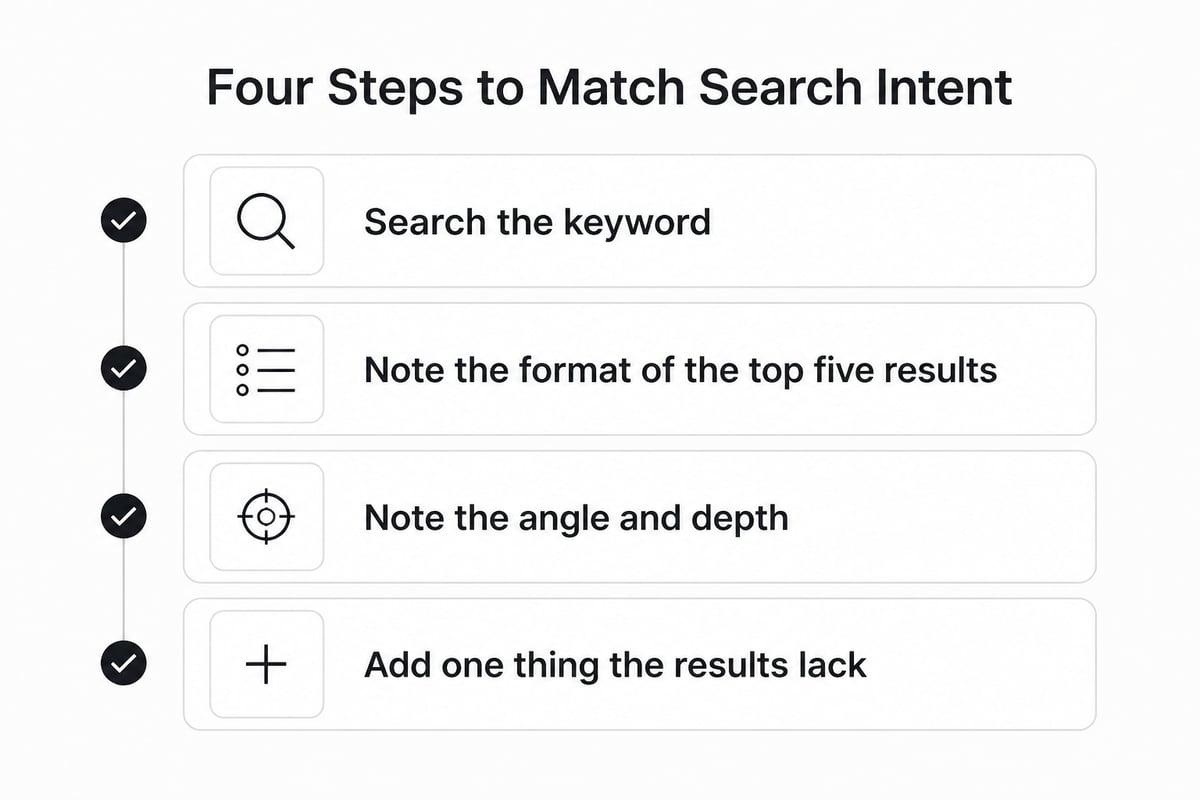
Search intent is the reason behind a query, and your post has to match it or it will not rank, however well optimized it is. Google shows results that satisfy the searcher, so the fastest way to learn the intent is to read page one.
Search your target keyword and look at the top five results. Note three things:
- The format. Are they how-to guides, lists, comparisons, tool pages or definitions?
- The angle. Are they written for beginners or experts? For buyers or learners?
- The depth. Are they 800 words or 3,000?
If every result is a step-by-step guide and you write an opinion essay, you are off target. Match the format first, then add something the others lack: a clearer example, a real number, a template, a trade-off stated honestly.
On length, there is no magic count. Write as long as the topic needs and no longer. If you want a rule of thumb, our piece on blog post length for SEO covers how to decide.
Structure the post for readers and for Google
A well-structured post is easy to scan, and that helps both readers and search engines. Google's SEO Starter Guide recommends content that is easy to read and well organized, unique, up to date, and helpful, reliable and people-first.
Use this structure for most posts:
- One H1, which is your post title. Put the main keyword in it.
- Intro that answers the question in the first one or two sentences. Do not warm up.
- H2 sections that each cover one subtopic. Open each section with a sentence that answers the heading.
- H3s only where a section has real sub-parts.
- Short paragraphs, with lists and tables where items are parallel.
- Original examples, screenshots or numbers where you have them.
Each H2 is a chance to rank for a related phrase and to be quoted on its own. A reader who skips straight to one section should still get a full answer.
Also write for the person who is in a hurry. Bold the two or three terms that matter. Use numbered lists for steps. Keep sentences short. Plain writing is not a style choice here; it is how people read on a phone.
Write the title, meta description and URL
The title, meta description and URL are the first things a searcher sees, and they decide whether someone clicks. Get these right on every post.
Title. Keep it under about 60 characters so it does not get cut off. Put the main keyword near the front and say what the reader gets. "SEO for Blog Posts: A Guide to Ranking Your Articles" does both.
Meta description. Write 140 to 150 characters. Include the keyword naturally and say what the page delivers. Google may rewrite it, but a good one often stays. Google's developer SEO guide covers descriptive page titles and meta descriptions in more detail.
URL. Keep it short and readable. Use /blog/seo-for-blog-posts, not /blog/2026/11/11/post-4827. Avoid dates in the path so you can update the post later without a mismatch.
Image alt text. Describe what the image shows in plain words. It helps accessibility and gives Google context.
Do not write these by hand for 50 posts if you can avoid it. This is the kind of repetitive work that tools handle well, and the quality check is simple: read the title and description out loud and ask if you would click.
Build internal and external links
Links tell Google how your pages relate and help readers move through your site. Google says links help it discover pages and recommends descriptive anchor text so readers and search engines can understand what a linked page is about.
For internal links, aim for three to five per post:
- Link to related posts and to the product or service page the reader might want next.
- Use anchor text that describes the target, such as "our guide to writing articles for SEO", not "click here."
- Go back to older posts and add links to the new one. Most people forget this half.
For external links, point to the source behind any statistic or claim. Two or three good sources make a post more trustworthy and give readers a way to check you.
Backlinks from other sites are the harder part. You can earn them by publishing something worth citing, such as original data or a clear how-to, and by contacting a few relevant sites. Our overview of digital PR for SEO explains how to get started without an agency.
Add structured data and keep pages fast
Structured data and page speed are the technical layer that supports your content. They will not rescue a weak post, but they remove friction from a good one.
Structured data. Google says Article structured data can help it understand a blog post and show better title text, images and date information in results. Supported types include Article, NewsArticle and BlogPosting. If you use WordPress, Shopify or Webflow, a plugin or built-in setting usually handles this. Google's structured data intro explains what it does and how it affects rich-result eligibility.
Page speed. Google's recommended Core Web Vitals targets are LCP within 2.5 seconds, INP under 200 milliseconds and CLS below 0.1. In plain terms: the main content loads fast, the page responds quickly to taps, and nothing jumps around as it loads. Compress images, avoid heavy plugins and test key posts in PageSpeed Insights.
Also check the basics: the post is indexable, it sits in your sitemap, it works on mobile, and it has no broken links.
Show real expertise
Readers and search engines both look for signs that a real person with real knowledge wrote the post. Thin, generic content is the easiest kind to ignore.
HubSpot's 2025 report found that 43% of blog-producing businesses cite published works and citations to establish author expertise, while 42% use author bios with credentials. You can do the same without much effort:
- Add an author name and a two-line bio with relevant experience.
- Include your own numbers, screenshots, customer questions or mistakes.
- Cite your sources and link to them.
- Update old posts when facts change, and show the update date.
A post that says "we ran this for three clients and here is what changed" beats a post that restates what ten other sites already say.
Publish on a schedule and track results
A consistent schedule matters more than bursts of effort, because each post adds to the ones before it. Ten posts a month for a year will outperform fifty posts in one month and nothing after.
Pick a pace you can keep. For a small business, one to three posts a week is realistic if you write by hand, and it is often too much. This is where most blogs stall: the owner writes four posts, gets busy, and stops.
Then measure. Connect Google Search Console, which is free, and watch three numbers: impressions, clicks and average position. Early on, impressions are the signal that matters. Rising impressions on a new post mean Google has indexed it and is testing it. Clicks follow once the position improves.
Expect a slow start. A new post often takes a few weeks to show impressions, and steady growth tends to show around months three or four, because older posts keep compounding while new ones get added. After three months, look at each post and ask:
- Getting impressions but few clicks? Rewrite the title and description.
- Ranking on page two? Add depth, examples and internal links.
- Getting nothing? Check indexing, then check whether the keyword was realistic.
Where AI tools fit in
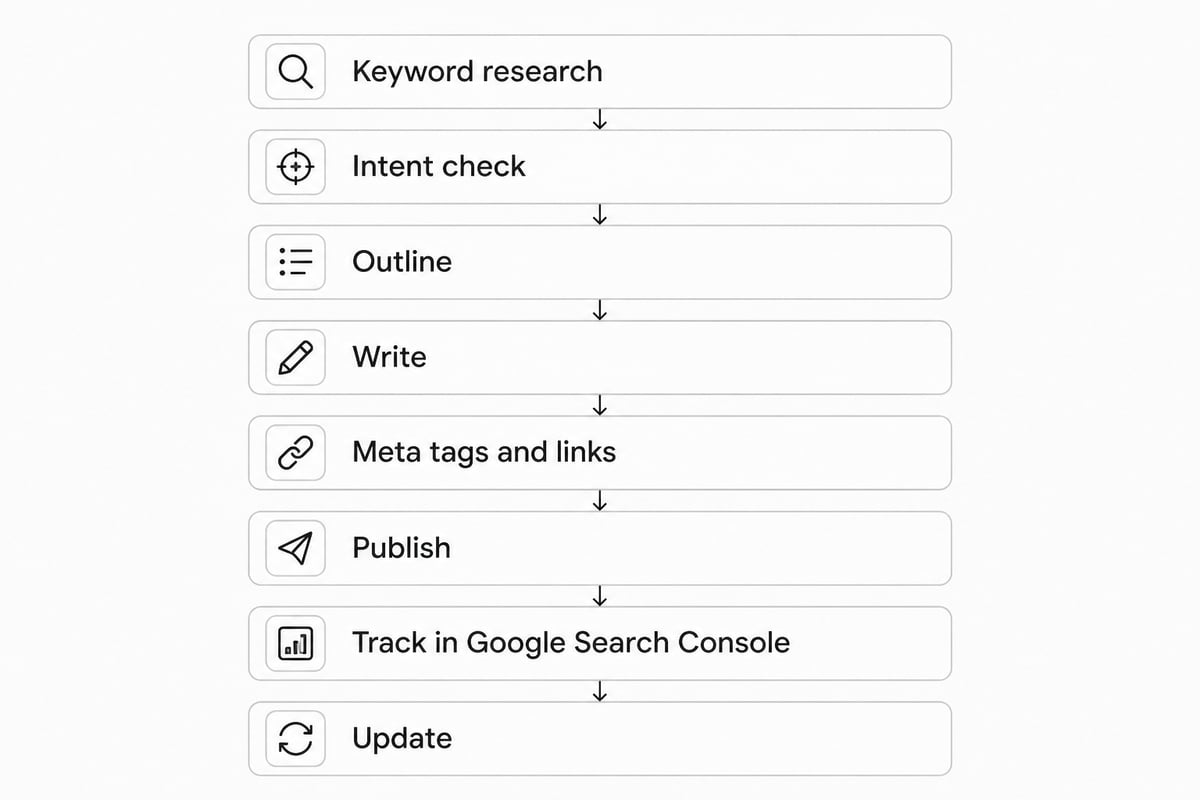
AI tools can handle the repetitive parts of blog SEO: research, drafting, meta tags, linking and publishing. They do not replace judgment about what your business should say.
Google has said it ranks helpful content regardless of how it was made, and it penalizes unhelpful content whether a person or AI wrote it. So the question is not "was this written by AI?" It is "is this useful, accurate and original?" Review what comes out before it goes live. Our guide to using AI for SEO covers where it helps and where it does not.
If you run a small business and would rather not write 30 posts a month, RankPill plans, writes and publishes SEO articles to your site on a schedule you set. It finds keywords from your site, competitors and live search data, writes articles of about 1,000, 2,000 or 3,000 words with images, internal and external links and meta tags, and publishes to WordPress, Shopify, Webflow, Wix, Framer or any site through webhooks. You can choose to approve topics or review each article first. It costs $99 a month per website for 30 articles, which works out to about $3 an article.
It is not the right fit if you want only hand-written content, or if your site cannot connect to a supported publishing platform.
Think about AI search too
Blog posts now also feed AI assistants, which pull answers from pages across the web. Clear, well-sourced posts on the exact questions your customers ask have a chance to be cited in ChatGPT, Gemini and Google AI Overviews, even if you do not rank first on Google.
The habits are the same as good SEO: answer the question directly, name your sources, keep facts current and use plain headings. For more, see our posts on SEO for AI search and SEO for ChatGPT.

A pre-publish checklist for every post
Run this list before you hit publish. It takes five minutes once you have done it a few times.
- The main keyword is in the title, the first paragraph and one H2.
- The intro answers the question in the first one or two sentences.
- The format matches what ranks on page one.
- The meta description is 140 to 150 characters and reads like a human wrote it.
- The URL is short and readable.
- There are three to five internal links with descriptive anchor text.
- Every statistic links to its source.
- Images are compressed and have alt text.
- The page is mobile-friendly, indexable and in your sitemap.
- An author name and bio are visible.
Open Google Search Console today and list your five posts with the most impressions but the fewest clicks, then rewrite their titles and meta descriptions. If you would rather not run the writing and publishing side yourself, Try RankPill and let it plan, write and publish articles to your site on your schedule, starting with a 3-day trial for $1.
Unlock Traffic on Autopilot
Grow organic traffic on autopilot. RankPill will research, write, optimize, and publish articles to your website daily.