
What Is a Traffic Check? Website Traffic Explained

Modest Mitkus · November 27, 2026
A traffic check is a review of how many people visit your website, where they come from and what they do once they arrive. You run one by looking at the numbers in a free analytics tool, such as Google Search Console, Google Analytics or a traffic checker, and comparing them against an earlier period.
The point is simple. You can't grow what you don't measure, and most small sites guess. A short traffic check once a month tells you which pages bring visitors, which sources are growing and whether the work you are doing is paying off.
What a traffic check measures
A traffic check measures four things: how many people arrive, which channel sent them, which pages they land on and whether they stay. Each one answers a different question about your site.
- Volume: how many visits or sessions you get in a period.
- Source: whether visitors came from Google, social media, another site, an email or by typing your address directly.
- Pages: which URLs attract the most visits and which get none.
- Engagement: whether visitors read, click around or leave straight away.
You don't need all of these on day one. If you run a small business site with 20 pages, volume and source are enough to start. The rest becomes useful once you have something to compare against.
Key terms: visits, page views, clicks and impressions
Different tools use different words for traffic, and the numbers don't match across them because each tool counts something slightly different. Knowing the definitions stops you from comparing the wrong figures.
Cloudflare, for example, defines a page view as a successful HTTP response with an HTML content type, and a visit as a page view that comes from a different website or a direct link. One visit can contain several page views.
Google Search Console uses another set of terms. In its Performance report, a click is a user clicking a link to your site from Google Search results, and an impression is your site appearing in those results. Click-through rate is clicks divided by impressions.
| Term | What it counts | Where you see it |
|---|---|---|
| Impression | Your page appeared in Google results | Search Console |
| Click | A searcher clicked through to your site | Search Console |
| Session | A group of interactions from one visitor | Google Analytics |
| Page view | A single page load | Analytics, Cloudflare |
| Visit | A page view arriving from another site or a direct link | Cloudflare |
An impression is not a visitor. A page can have thousands of impressions and still get few clicks if the title and description don't earn the click.
How a traffic check works, step by step
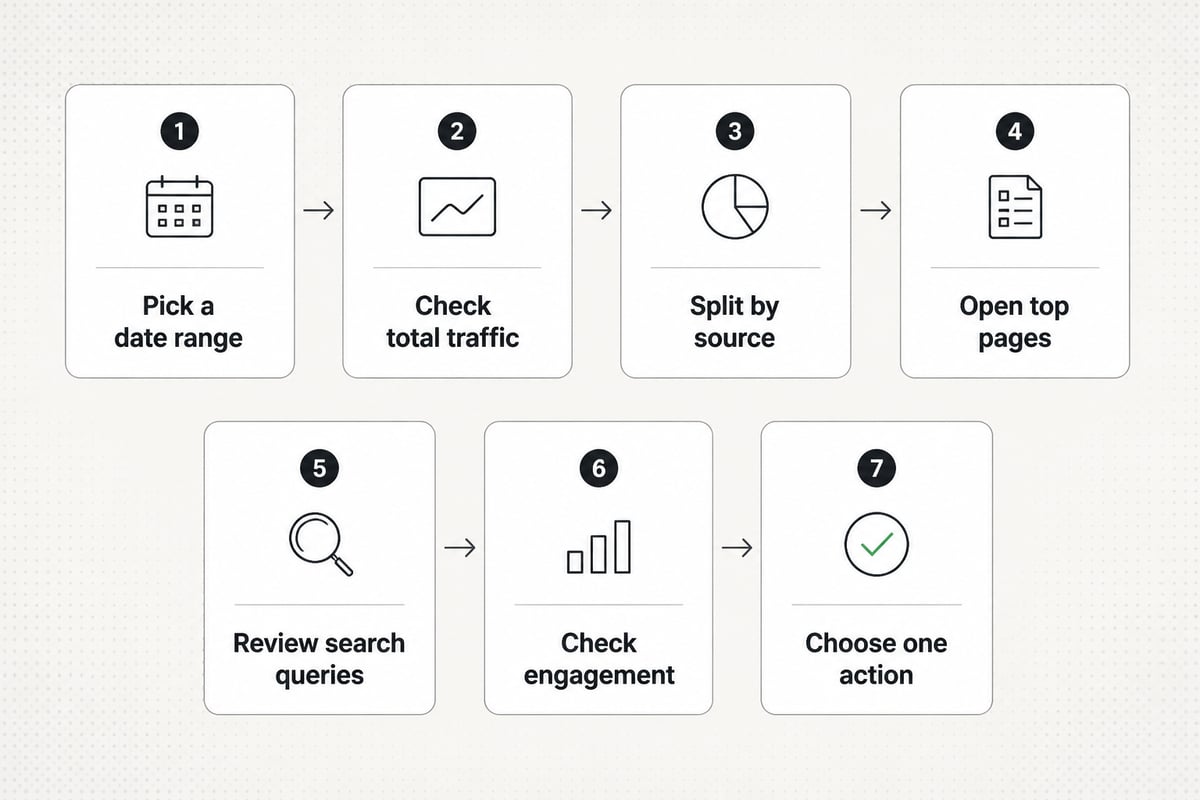
A traffic check works by pulling your visit data from a tool, splitting it by source and page, and comparing it with a previous period. You can finish it in about 15 minutes once your tools are connected.
- Pick a date range. Use the last 28 days against the 28 days before. Search Console's default view covers the past three months, which is fine for spotting direction but too slow for monthly decisions.
- Check total traffic. Is it up, down or flat? Write the number down so you have a record.
- Split by source. Organic search, direct, referral, social and email each tell a different story.
- Open the top pages. List the ten pages with the most visits. Note any that grew or dropped sharply.
- Look at the search queries. In Search Console, see which searches show your site and how often people click.
- Check engagement. See whether visitors stay or leave at once.
- Decide one action. Update a page, write a new one or fix a technical problem. One action beats a long to-do list.
Free tools for a traffic check
You can run a useful traffic check with free tools, and you only need two or three of them. Each one covers a different part of the picture.
Google Search Console
Search Console shows how people find you in Google. Its Performance report tracks clicks, impressions, click-through rate and average position. Google's guide to finding popular queries and pages walks through how to read it. It is free, and it is the closest thing to a direct view of your Google traffic.
Google Analytics 4
GA4 shows what visitors do after they arrive. It also reports engagement. An engaged session lasts longer than 10 seconds, includes a key event, or has at least two page or screen views. Engagement rate is the share of engaged sessions, and bounce rate is the share of sessions that were not engaged, according to Google Analytics Help.
Privacy-friendly analytics
If you don't want cookie banners, Cloudflare Web Analytics offers a privacy-oriented way to see page performance and visitor activity. It is lighter than GA4, and it shows less.
Quick estimate tools
A website traffic checker gives you an estimate for any domain without needing access to its analytics. Treat these figures as rough. They are modeled from keyword data, so they can be off by a wide margin, especially for small sites. They are best for comparing yourself with a competitor, not for exact reporting.
Reading the numbers: what a healthy site looks like
A healthy small site shows steady growth in organic visits, a spread of traffic across several pages and a rising count of search impressions. The exact numbers depend on your niche, so compare yourself with your own history first.
Watch for these patterns:
- Impressions up, clicks flat. Google shows you more, but searchers aren't choosing you. Rewrite titles and meta descriptions.
- One page drives most visits. That is a risk. If it drops in rankings, your traffic collapses. Build more pages that target related searches.
- Direct traffic is your biggest source. This often means people already know you. It can also mean your analytics can't tell where some visits came from.
- Traffic drops after a site change. Check for broken links, blocked pages or removed content.
Don't read too much into a single week. Daily traffic swings with weekdays, holidays and news. Compare equal periods and look at the trend over several months.
Traffic sources to separate in every check
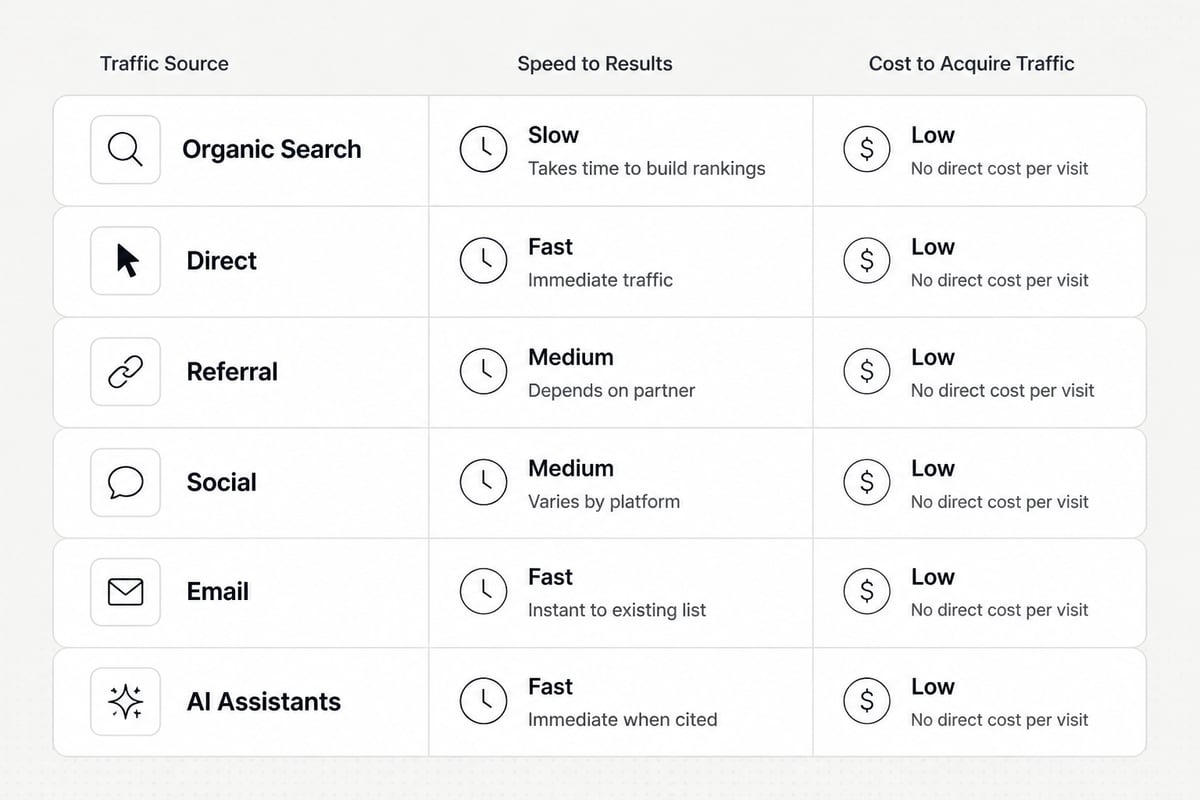
Splitting your traffic by source is the most useful part of a traffic check, because each source behaves differently and needs a different fix. A site with 1,000 monthly visits can be healthy or fragile depending on where they come from.
- Organic search: visitors from Google and other engines. This is the cheapest source over time. Our guide to organic search traffic explains how it builds.
- Direct: people typing your address or using a bookmark.
- Referral: visitors from links on other sites. See referral traffic for how to earn more.
- Social and email: useful for launches, short-lived by nature.
- AI assistants: visitors who click through from ChatGPT, Gemini and similar tools. This source is small for most sites but is growing, and it often hides inside "direct" or "referral" in your reports. Our AI traffic guide explains how to spot it.
Paid ads are the other major source, but this article covers unpaid traffic, which is what most founders without a marketing budget rely on.
How often to run a traffic check
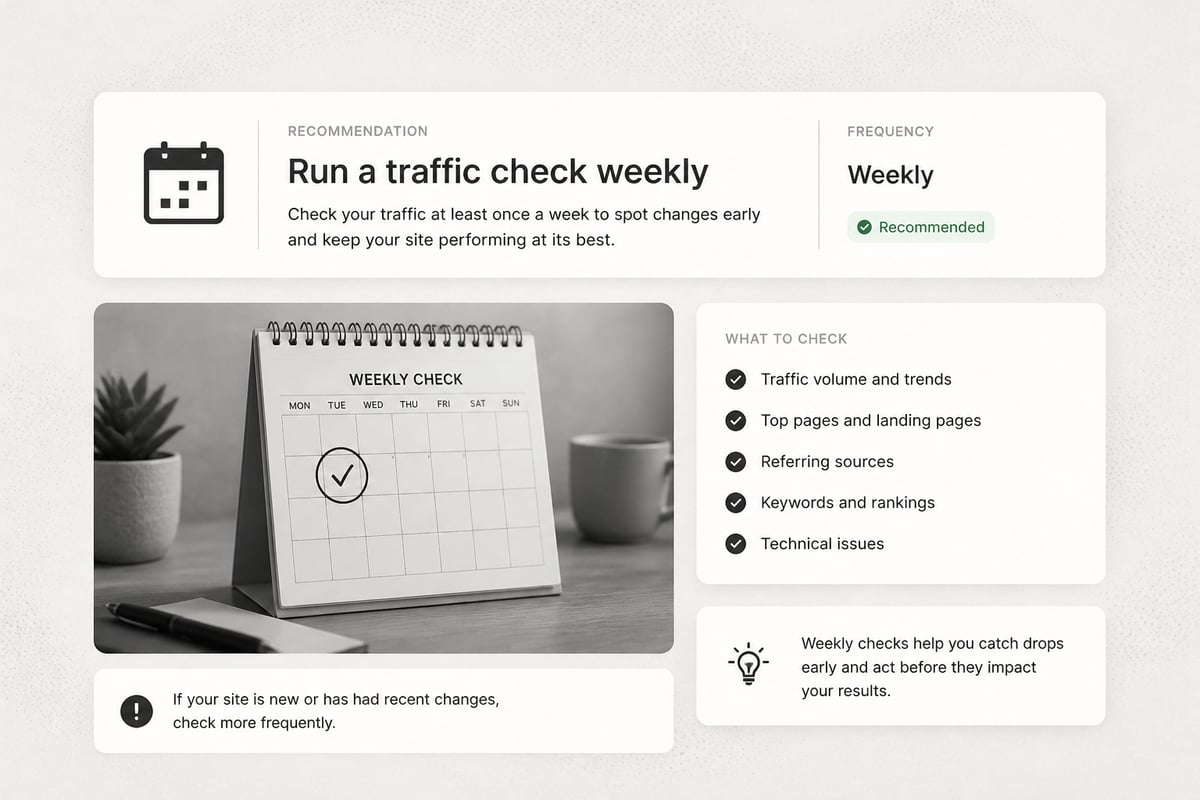
Run a full traffic check once a month and a quick glance once a week. That rhythm catches problems early without turning analytics into a daily habit that eats your time.
A weekly glance takes five minutes. Look at total clicks in Search Console and ask one question: is anything broken? A sudden drop to zero usually means a tracking error or a site problem, not a ranking loss.
The monthly check is where you decide what to do. Compare the month against the previous one and against the same month last year if you have it. Write down three things: what grew, what fell and one action for the next month.
SEO results are slow, so don't change strategy after seven days. Articles often take weeks to appear in results, and traffic from them tends to compound as more pages get indexed. Judge the trend over a quarter.
A traffic check for a small business site: example
Hypothetical example: a small online shop runs a traffic check and finds one page earns most of its organic clicks.
In a shop like this, a 28-day check might show a few thousand impressions with a low click-through rate, most of them from a single guide page, while product pages get almost no organic visits.
The reading is clear: one page earns most of the search visits while the rest of the catalog is largely ignored. The next actions are to improve the titles on the product-related pages and to publish new articles around the questions customers ask, linking to those product pages.
This is the part of the cycle where many small teams stall. Checking traffic takes 15 minutes. Producing the content to change it takes hours every week.
What to do when the check shows low traffic
When a traffic check shows low traffic, the usual cause is not enough content aimed at searches people actually make. Most fixes come down to publishing more useful pages and making existing ones easier to find.
Work through these in order:
- Confirm tracking works. Make sure your analytics code is installed and Search Console is verified.
- Check that pages are indexed. Pages Google hasn't indexed can't bring traffic. The robots.txt checker helps confirm you aren't blocking them by accident.
- Find keywords you can win. Look for searches with real volume and low difficulty. The keyword difficulty checker shows how hard a term is.
- Publish consistently. One article a month rarely moves anything. Steady output matters more than one perfect post.
- Update what exists. Refresh pages that have impressions but few clicks.
If you have no time to write, the bottleneck is production, not analysis. RankPill is built for that gap. It finds keywords your site can rank for, writes articles with images and internal links, and publishes them on the schedule you set to WordPress, Shopify, Webflow, Wix, Framer or any site through webhooks. It is not the right fit if you want only hand-written content, or if your site can't connect to a supported publishing platform.
Mistakes that make a traffic check misleading
Most bad traffic checks fail because of how the data is read, not because the tools are wrong. A few habits cause most of the errors.
- Comparing numbers from different tools. Search Console clicks, Analytics sessions and Cloudflare visits count different things. They will never match exactly.
- Counting your own visits. Your team's browsing inflates small sites. Filter out internal traffic where your tool allows it.
- Trusting estimates as facts. Third-party traffic estimates are models. Use them for direction only.
- Ignoring bots. Some analytics tools count automated visits. A sudden spike with zero engagement is often a bot.
- Chasing traffic without a goal. Ten thousand visits that never buy or sign up are worth less than 500 that do. Track one conversion alongside traffic.
- Checking too rarely. Quarterly checks miss problems that cost you weeks of visits.
Related terms
These terms come up around a traffic check, and each has a distinct meaning.
- Traffic analysis: a deeper study of trends, segments and behavior, usually done over a longer period than a routine check.
- Organic traffic: unpaid visits from search results.
- Click-through rate (CTR): clicks divided by impressions.
- Bounce rate: in GA4, the share of sessions that were not engaged.
- Keyword ranking: your position in search results for a term. A keyword rank checker shows where you stand.
- AI visibility: how often AI assistants mention or cite your brand. RankPill Plus tracks this daily in ChatGPT, Gemini and Google AI Overviews.
- Domain Rating: a score for the strength of a site's backlinks, which affects how easily it ranks.
Open Search Console today, set the date range to the last 28 days, and write down your total clicks, impressions and your top five pages. That gives you a baseline to beat next month. If the numbers show you need more content and have no time to write it, Try RankPill to plan, write and publish SEO articles to your site on a schedule, starting with a 3-day trial for $1.
Unlock Traffic on Autopilot
Grow organic traffic on autopilot. RankPill will research, write, optimize, and publish articles to your website daily.