
What Is Blogging? A Founder's Guide to Business Blogs

Modest Mitkus · November 2, 2026
Blogging is publishing written articles on a website in reverse chronological order, where the newest posts appear first. Each article (called a post) stays on your site permanently and ranks in search engines for keywords related to your business. For founders, blogging is how you show up in Google and ChatGPT when customers search for solutions you provide. A blog turns your website into a customer acquisition channel. It works because search engines crawl and index your content, then show it to people typing questions your articles answer.
Why Blogging Still Matters in 2026
Many founders think blogging died years ago. It didn't. The format changed, but the principle is the same: write helpful content, rank for keywords, get traffic.
Search engines still need content. Google indexed over 400 billion web pages in 2025. Most of those pages are blog posts. ChatGPT and Perplexity cite blog articles in their answers. If your business doesn't publish content, you're invisible to people searching for what you sell.
Blogs convert better than ads. Someone who clicks an ad knows you paid to reach them. Someone who finds your blog post through search chose to read it. They trust you more. Data from Orbit Media shows 77% of internet users read blogs regularly, and blog readers spend more time on sites than visitors from other sources.
Blogging builds domain authority. Every published article is a page search engines can crawl. More indexed pages means more keyword rankings. More rankings means more traffic. More traffic signals to Google that your site is relevant, which helps all your pages rank higher.

Here's what changes when you answer "what is blogging" in a business context:
- Blogs used to be personal journals; now they're content assets
- Posts used to be short updates; now they're long-form guides
- Traffic used to come from RSS readers; now it comes from search
- Success used to mean comments; now it means conversions
How Blogging Works Technically
A blog is a section of your website. It runs on a content management system like WordPress, Shopify, Webflow, Wix, or Framer. Each post has a URL, a publish date, categories or tags, and sits in your site's navigation.
When you publish a post, your CMS adds it to your sitemap. Search engines crawl your sitemap regularly. They read the post, index it, and start showing it in search results for keywords in the article. That process takes days to months depending on your domain authority and how competitive the keyword is.
Core Blog Components
Every blog has the same structure:
| Component | Purpose | Example |
|---|---|---|
| Posts | Individual articles | "How to reduce churn" |
| Categories | Topic grouping | Marketing, Sales, Product |
| Tags | Specific subjects | SEO, automation, analytics |
| Archives | Date-based organization | November 2026 posts |
| Comments | Reader engagement | Question and answer threads |
Post URLs should include the keyword. Not the date. /what-is-blogging ranks better than /2026/11/02/post-title.
Internal links connect related posts. They help search engines understand your site structure and keep readers on your site longer. Every post should link to 3-5 other posts.
External links cite sources and add context. They show search engines your content is well-researched. Link to authoritative sites, not competitors.
WordPress maintains a comprehensive introduction to blogging that covers the technical basics and common publishing workflows.
Types of Business Blogs
Not all blogs serve the same purpose. The type you choose depends on what you're trying to accomplish.
SEO Blogs
These exist to rank for keywords and bring search traffic. Every post targets a specific search query. The goal is visibility in Google and ChatGPT, not engagement or social shares.
Format: Long-form guides (2,000 to 4,000 words), tutorials, comparison articles, "how to" posts.
Publishing frequency: Daily or multiple times per week. Search engines favor sites that publish consistently.
Measurement: Organic traffic, keyword rankings, backlinks.
Thought Leadership Blogs
These position your founder or company as an expert. Posts share opinions, analysis, and original research. The audience is your industry, not end customers.
Format: Essays, case studies, data reports, contrarian takes.
Publishing frequency: Weekly or bi-weekly. Quality matters more than quantity.
Measurement: Social shares, citations from other sites, inbound partnership or media requests.
Product Blogs
These explain how to use your product and announce new features. The audience is current and potential customers.
Format: Feature announcements, use case walkthroughs, customer stories, integration guides.
Publishing frequency: As needed, usually weekly.
Measurement: Product signups, feature adoption, support ticket reduction.
Most B2B companies run a mix of all three. SEO posts bring traffic. Thought leadership builds credibility. Product posts convert visitors into customers.

Creating Content That Ranks
Understanding what is blogging is simple. Writing posts that actually bring traffic is harder. Here's what works in 2026.
Start with keyword research. Use a tool to find keywords your site can rank for. Look for search volume between 100 and 5,000 monthly searches and keyword difficulty below 40. Those keywords have enough traffic to matter but aren't dominated by large sites.
Match search intent. If someone searches "what is blogging," they want a definition and explanation, not a sales page for your blogging course. Study the top 10 results for your keyword. Write something similar in structure but better in depth or clarity.
Write long-form. Posts under 1,000 words rarely rank. Aim for 2,000 to 3,000 words. Cover the topic completely. Answer follow-up questions the reader will have. Google's documentation for content creators emphasizes comprehensive, helpful content over keyword density.
Use clear structure. Break the post into sections with H2 and H3 headings. Use bullet lists and tables. Add images. Make it easy to scan. Most readers skim before they read.
Add internal links. Every post should link to 3-5 related posts on your site. This helps search engines understand your content and keeps readers engaged. If you're explaining how to build backlinks, link to posts on domain authority and link building strategies.
Cite external sources. Link to studies, tools, and authoritative sites. This adds credibility and context. Don't be afraid to link to competitors if they wrote something genuinely useful.
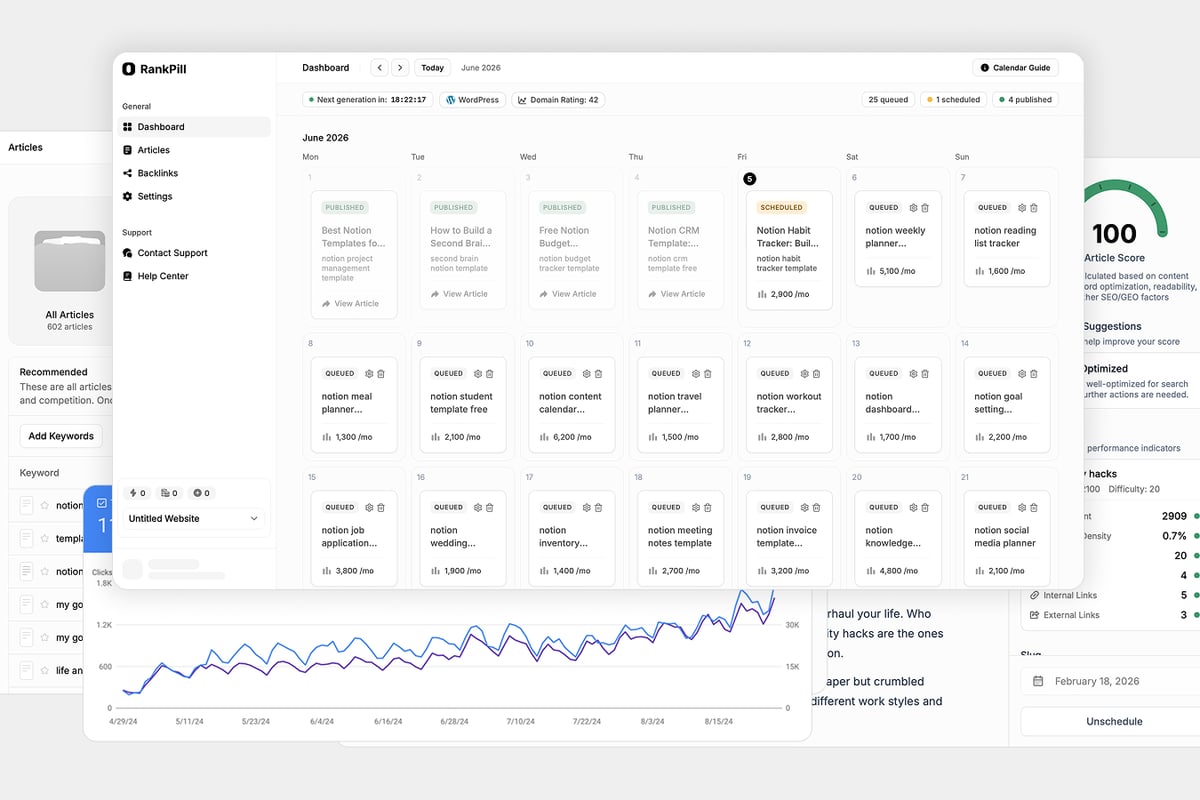
Many founders spend weeks writing their first few posts manually, then realize they can't keep up the pace. SEO automation tools handle the research, writing, and publishing so you can focus on running your business.
Publishing and Workflow
Most founders start blogging with good intentions and quit after three posts. The problem isn't ideas. It's the workflow.
Here's the full process:
- Keyword research to find what to write
- Outline creation to structure the post
- First draft written to match search intent
- Editing for clarity and flow
- Image creation or sourcing
- Internal linking to related posts
- Meta title and description for search snippets
- Publishing to your CMS
- Promotion through email and social
That's 6 to 10 hours per post if you do it manually. To publish daily, you need a system.
Automation Options
Templates speed up formatting. Save an outline structure for common post types (how-to guides, comparison posts, listicles). Reuse it.
Batch writing lets you write multiple drafts in one session, then edit and publish them over several weeks. Most writers find it easier to stay in "writing mode" than to switch between research, writing, and editing.
AI tools handle research, drafting, and publishing. They find keywords, write posts, add images and links, and publish to your CMS daily. This approach trades your time for a monthly fee. It works if you value consistency over complete creative control.
WordPress's guide to starting a blog walks through platform setup and basic publishing workflows for beginners.
Measuring Blog Performance
Traffic is the simplest metric. Use Google Analytics or your CMS's built-in analytics to track visitors, page views, and traffic sources. Google's Analytics 4 documentation explains how to track engagement programmatically if you want detailed custom reports.
Organic traffic is visitors from search engines. This is what matters for SEO blogs. If your organic traffic is growing month-over-month, your blog is working.
Keyword rankings show which posts rank and where. Track your top 20 keywords. If they're moving up, you're gaining visibility. If they're stuck or declining, update those posts or write new ones targeting less competitive keywords.
Backlinks are links from other sites to your posts. More backlinks usually means higher domain authority and better rankings. You can track backlinks in Google Search Console or tools like Ahrefs. Building links through a backlink exchange accelerates growth if you're in a competitive niche.
Conversions matter more than traffic. Set up goals in Google Analytics to track email signups, demo requests, or purchases that come from blog traffic. If 1,000 visitors produce zero conversions, your content isn't aligned with what your customers need.
Benchmarks for 2026
HubSpot's research on blogging ROI shows the median blog gets 3,400 monthly visitors. Top performers publish at least weekly and earn 10x more traffic. Companies that blog daily report 5x more leads than companies that blog monthly.
Your blog won't hit those numbers in month one. Expect 3 to 6 months before you see meaningful traffic. Expect 12 months before blogging becomes a reliable lead source.
Common Blogging Mistakes
Most founders make the same errors when they start blogging.
Writing for yourself instead of searchers. Your blog exists to bring customers. Write about problems they're searching for, not topics you find interesting.
Publishing randomly. Posting once in January and three times in March doesn't work. Search engines favor consistency. Pick a frequency you can sustain and stick to it.
Ignoring keyword research. Writing great content about a topic nobody searches for wastes time. Start with keywords that have search volume.
Thin content. A 400-word post rarely ranks. Write long enough to cover the topic completely. That usually means 2,000+ words.
No internal links. Every post should link to other posts on your site. Internal links help search engines crawl your site and understand how your content connects.
Forgetting about updates. A post from 2022 with outdated information hurts your credibility. Update your top posts every 6 to 12 months. Refresh stats, add new sections, improve clarity.
Expecting instant results. SEO takes time. You won't rank on page one in week two. Most posts need 3 to 6 months to reach their peak ranking.
Blogging for Different Industries
The question "what is blogging" has different answers depending on your business model.
SaaS and Software
SaaS blogs focus on SEO and product education. Target keywords like "how to [solve problem]" and "[your category] alternatives." Publish comparison posts, integration guides, and use case tutorials. Aim for daily publishing if possible. SEO for software companies requires consistent content because your competitors are all doing the same thing.
E-commerce
E-commerce blogs target product-related keywords and buying guides. Write posts like "best [product type] for [use case]" and "how to choose [product category]." Include product links in every post. Publish 3-7 times per week. Focus on converting readers into buyers.
Services and Agencies
Service blogs demonstrate expertise and answer client questions. Write about processes, case studies, and common problems. Target long-tail keywords that signal buying intent like "[service] for [industry]" or "how much does [service] cost." Publish weekly. Measure by consultation requests and leads.
Local Businesses
Local blogs target geographic keywords. Write about "[service] in [city]" and "[city] guide to [topic]." Publish monthly. Combine blogging with Google Business Profile optimization and local directories.
Tools and Platforms
You need two things: a CMS to publish posts and a workflow to create them.
CMS options:
- WordPress powers 43% of the web. Self-hosted or through WordPress.com. Best for flexibility and SEO plugins.
- Shopify for e-commerce. Built-in blog with product integration.
- Webflow for custom design. Visual editor with full control.
- Wix and Framer for simplicity. Easy setup, fewer customization options.
Content creation tools:
- Keyword research tools like Ahrefs, SEMrush, or built-in tools from SEO platforms find what to write about.
- Writing tools like Google Docs, Notion, or AI content generators draft your posts.
- Image tools like Canva, Unsplash, or AI image generators create visuals.
- Link tracking through Google Search Console or backlink tools monitor performance.
Pick tools that fit your workflow. Don't over-complicate it. Most founders start with WordPress and Google Docs, then add tools as they scale.
Content Strategy and Planning
Blogging without a plan means you run out of ideas by post five. Build a content calendar.
Monthly planning: At the start of each month, list 20-30 keyword ideas. Group them into topic clusters. Schedule one post per day (or whatever frequency you can sustain). Queue the posts in your CMS or project management tool.
Topic clusters: Group related keywords into themes. If you write about email marketing, create a cluster with posts on subject lines, send times, automation, list building, and deliverability. Interlink all posts in the cluster. This structure helps search engines understand your expertise and ranks your posts higher.
Content types to rotate:
- How-to guides (60% of posts)
- Comparison posts (20%)
- Listicles (10%)
- Case studies (10%)
Updating old posts: Every quarter, review your top 20 posts by traffic. Update stats, add new sections, improve formatting. Republish with the current date. This signals freshness to search engines and can boost rankings.
The JBI guide to communicating research through blogs offers a structured approach to translating complex information into blog-friendly formats.
Building a Sustainable Blogging System
Most founders fail at blogging because they try to do everything manually. You can't write 3,000-word posts, find keywords, create images, build backlinks, and run your business.
The solution is treating blogging like a system, not a hobby.
Hire writers if you have budget. Good writers cost $200-$500 per post. You'll need to manage them, provide briefs, and edit drafts. This works if you publish 4-8 times per month and have a content manager.
Use AI tools if you want consistency without hiring. Tools find keywords, write drafts, add images, and publish daily. You review and edit, but the heavy lifting is automated. This works if you want to publish daily without a team. RankPill is built for this: it researches keywords, writes long-form posts, and publishes one article to your site every day.
Batch your own writing if you prefer full control. Block 2-3 days per month to write 8-12 posts. Schedule them to publish weekly. This works if you're a fast writer and enjoy the process.
Pick the approach that fits your time and budget. There's no "right" way, only the way you'll actually stick with.
Blogging is publishing content that ranks in search engines and brings customers to your business. It works when you publish consistently, target the right keywords, and write posts that match what people are searching for. If you want traffic without hiring a content team, RankPill handles the research, writing, and publishing automatically. It finds keywords your site can rank for, writes 3,000+ word articles with images and links, and publishes one post to your website every day. Built for founders who want organic growth on autopilot.
Unlock Traffic on Autopilot
Grow organic traffic on autopilot. RankPill will research, write, optimize, and publish articles to your website daily.
 WordPress