
AI Business Automation Tools: A Practical Guide

Modest Mitkus · November 24, 2026
AI business automation tools are software that handles repeatable work for you, such as answering customer questions, sorting invoices, drafting emails or publishing content, using AI to make decisions a fixed rule could not. For a small business, the best ones take one slow, boring job off your plate and do it on a schedule without you.
The pitch is easy to believe. The harder part is picking the right job to automate first. According to the OECD, the share of firms across OECD countries reporting AI use has risen steadily in recent years, from 8.7% in 2023 to 14.2% in 2024 and 20.2% in 2025. Adoption is growing fast, but many businesses still have not started. This guide covers what these tools do, which categories are worth your money, and how to choose without burning a month on setup.
What AI business automation tools actually do
AI business automation tools take a task that follows a pattern and run it without a person starting each step. The "AI" part means the tool can handle messy input, like a customer email written in a hurry, instead of only following if-then rules.
Older automation worked like a conveyor belt. If a form was submitted, send a template email. Newer tools read the form, decide what it is about, draft a reply that fits and route it to the right person.
Three traits separate useful tools from toys:
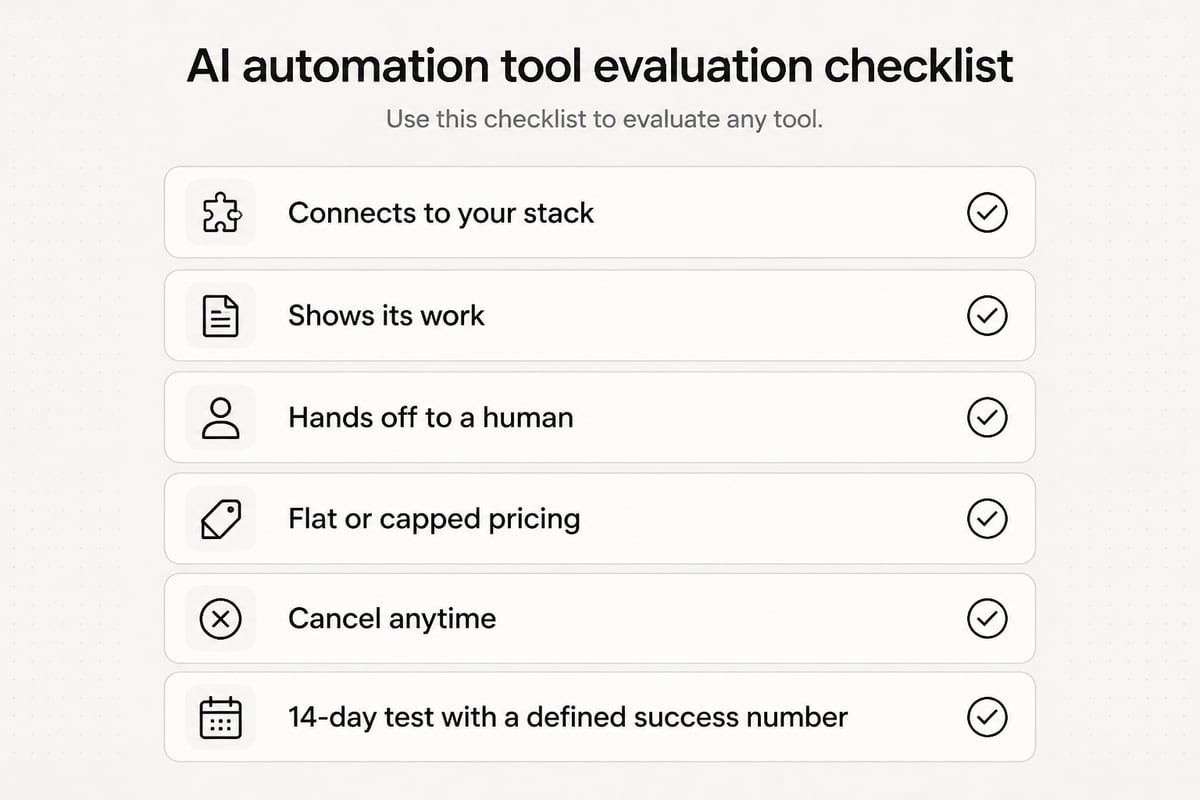
- They connect to the systems you already use. A tool that needs you to copy and paste between tabs is not automating anything.
- They run without you. Scheduled or triggered work is the point.
- They show their work. You should be able to see what the tool did and fix it.
If a tool fails any of these, skip it.
What are the best automation tools for business?
The best automation tools for business depend on the job, so group them by function and pick one per function. Here are the categories that pay off most for small teams, with examples of products you can look at.
| Job | What the tool does | Example products |
|---|---|---|
| Workflow connections | Links your apps and moves data between them | Zapier, Make |
| Customer support | Answers common questions, hands off hard ones | Intercom Fin, Tidio |
| Scheduling | Finds meeting times and books them | Calendly, Reclaim |
| Bookkeeping | Categorizes expenses and reads receipts | QuickBooks, Dext |
| Email and outreach | Drafts and sequences messages | Mailchimp, HubSpot |
| SEO content | Plans, writes and publishes articles | RankPill |
Prices and features change often, so check each vendor's own pricing page before you commit. Most offer a free tier or a trial, and you should use it.
Start with the category where you lose the most hours each week. If you spend Fridays reconciling receipts, bookkeeping comes first. If your inbox is full of the same five questions, start with support.
Customer support and chat assistants
Support assistants are the easiest win for businesses that get the same questions every day. You feed the tool your help pages, policies and past answers, and it replies to routine questions in seconds.
The trade-off is quality control. A bot that answers confidently and wrongly costs you a customer. Set it up so it hands off to you when it is unsure, refunds are involved or the customer sounds upset. Read a sample of its conversations every week for the first month.
Good fits: stores with repeat questions about shipping and returns, service businesses fielding "do you cover my area" messages, and software products with a help center. Poor fits: businesses where most questions are unique or high stakes.
Marketing and content automation
Marketing automation covers email sequences, social scheduling and content production, and content is where small teams lose the most time. Writing one good article takes hours. Most founders publish three posts, get busy and stop.
This is the gap AI content tools fill. They research keywords, draft articles and publish them on a schedule. Organic search then pays you back slowly but steadily, which suits a business with no ad budget. If you want to compare options, our guides to SEO automation tools and AI tools for SEO cover the field in more detail.
One tool in this category is RankPill. It finds keywords your site can rank for, writes articles of about 1,000, 2,000 or 3,000 words with images, internal and external links, and publishes them to WordPress, Shopify, Webflow, Wix, Framer or any site through webhooks. The RankPill plan is $99 a month per website and includes 30 articles a month, which works out to about $3 per article. New customers can start with a 3-day trial for $1 that includes 3 articles.
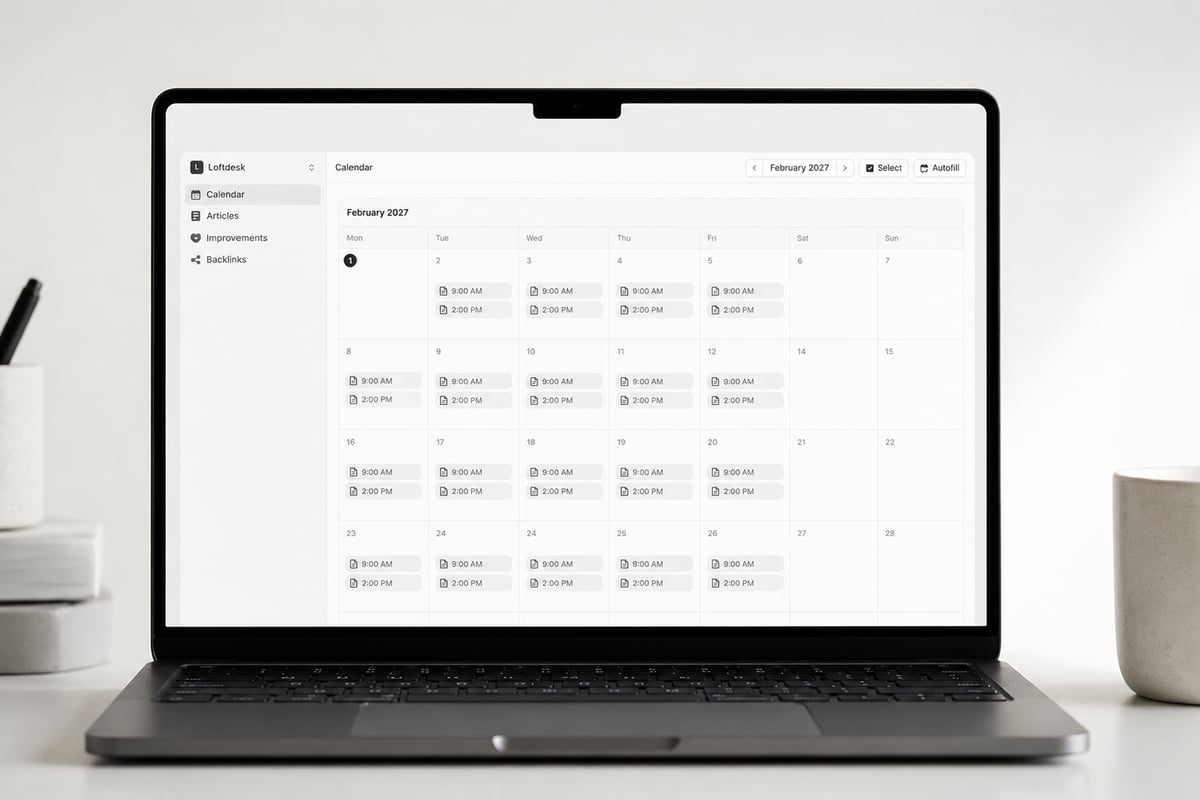
Be honest about the limits. Automated content works best on informational and how-to topics. If you only want hand-written copy, or your site cannot connect to a supported publishing platform, this is not the right tool. Results also take time. Most sites see early impressions within 2 to 3 weeks, with steadier growth from month 3 or 4, and there is no guaranteed timeline.
Finance, bookkeeping and admin
Finance automation saves the most hours per dollar for owners who do their own books. The tools read receipts, match bank transactions to categories and flag odd charges for you to check.
Accuracy matters here more than anywhere else. A miscategorized expense is a small problem. A wrong tax figure is a real one. Use these tools to prepare the work, then have an accountant or you review it before filing.
Admin tasks follow the same pattern:
- Invoicing: generate and send invoices on a trigger, then chase late payments with polite reminders.
- Scheduling: let a tool find times across calendars instead of trading six emails.
- Meeting notes: record, transcribe and summarize calls, then push action items to your task list.
- Data entry: pull details from PDFs and emails into a spreadsheet or CRM.
Each of these is small. Together they can give back a full day a week.
How to choose the right tool for your business
Choose by the cost of the problem, not by the feature list. A tool is worth buying when it saves more time or money than it costs and you will keep using it past the first week.
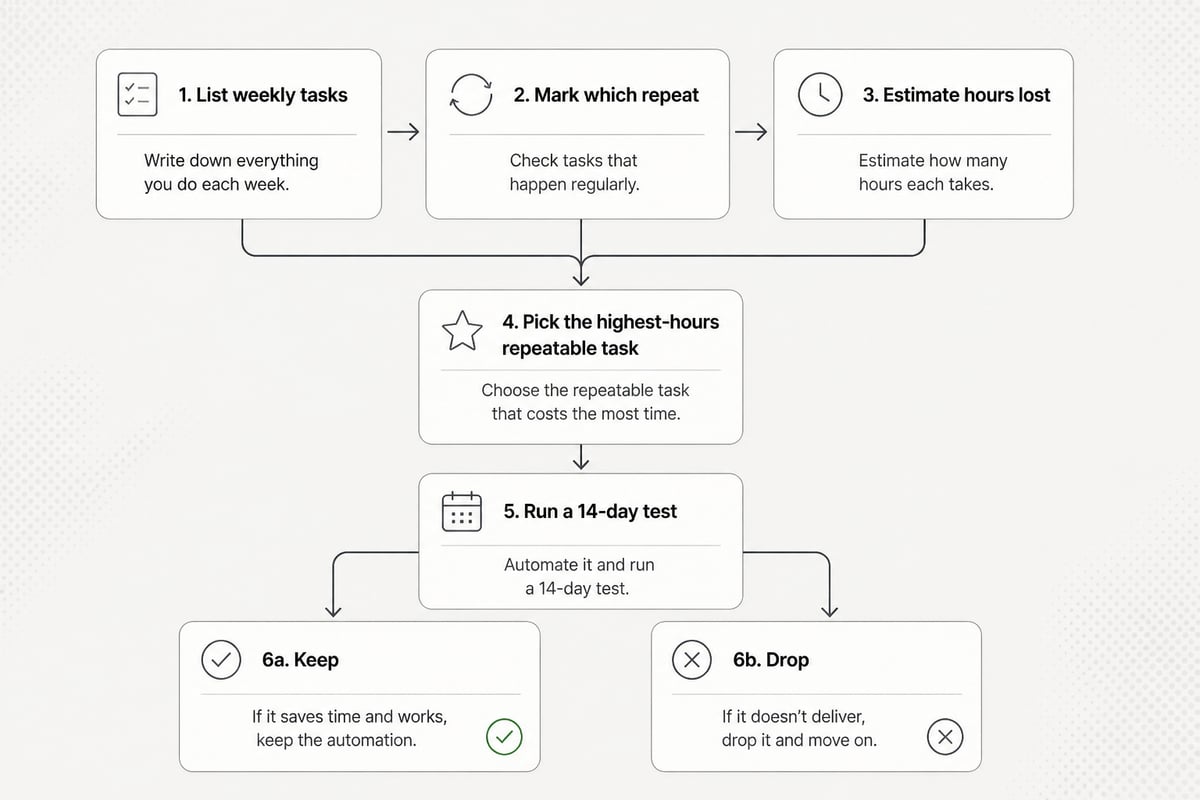
Work through these steps:
- Write down your repeat tasks. Track one week. Note anything you do more than twice.
- Estimate hours and dollar value. If a task takes 4 hours a week and your time is worth $50 an hour, that is $200 a week.
- Pick one task. Do not buy five tools at once.
- Check the connections. Confirm it works with your website platform, accounting software or CRM.
- Run a 14-day test. Use the free tier or a short trial, and define success first, such as "answers 60% of questions without me."
- Keep or cancel. Decide on the numbers, not on how impressive the demo looked.
Look closely at pricing models. Per-seat pricing punishes growing teams. Usage-based pricing can surprise you in a busy month. Flat monthly pricing with a clear cap is easiest to plan around. Also confirm you can cancel anytime and export your data.
Risks to manage before you automate
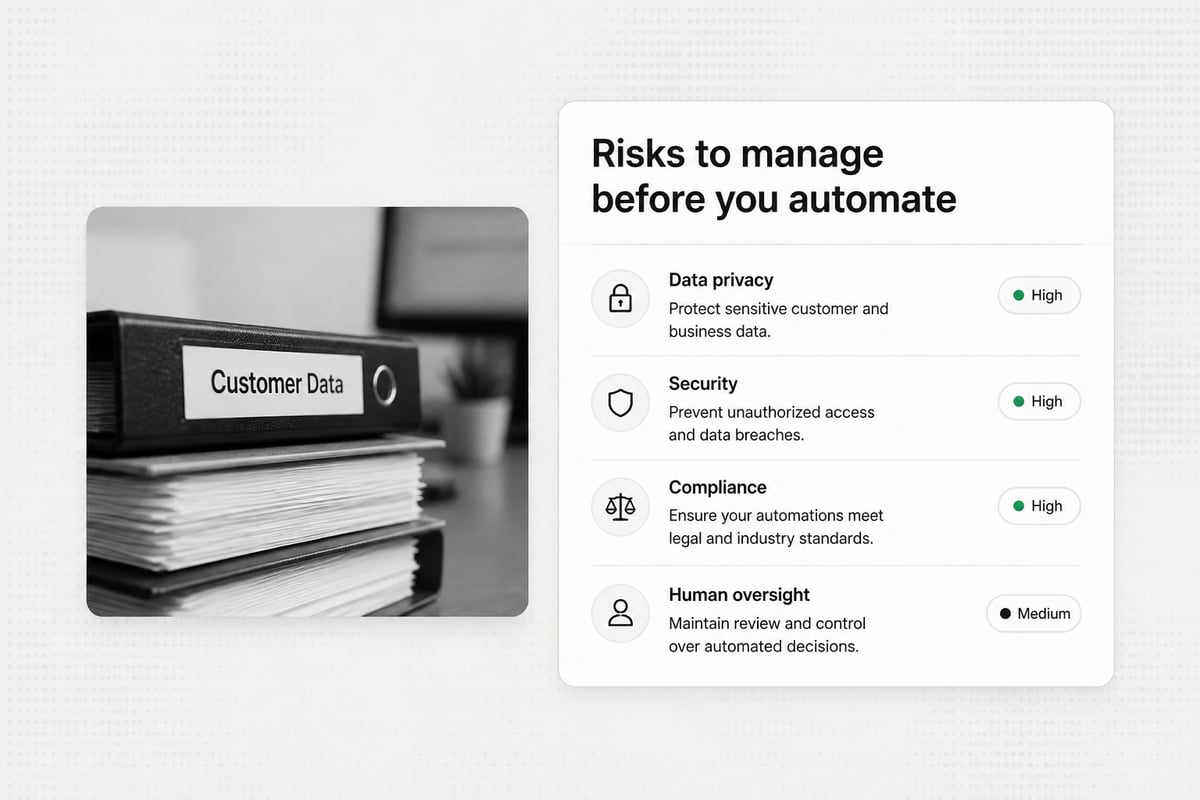
Every automation can fail, so decide up front where a human stays in the loop. The risks are practical: wrong answers sent to customers, private data shared with the wrong tool, and work nobody checks because "the system handles it."
A few rules keep this manageable:
- Keep approval steps on anything customer-facing until the tool has earned your trust. Many tools offer a review mode that holds output until you approve it.
- Limit the data you share. Do not paste customer financial details or health records into tools you have not vetted.
- Check output on a schedule. Spot-check 10 items a week.
- Keep a manual fallback. Know how to do the task by hand if the tool goes down.
If you want a formal reference, NIST publishes a voluntary AI Risk Management Framework that explains how organizations can address risk across AI design, development, use and evaluation. NIST also released a Generative AI Profile on July 26, 2024, with voluntary guidance for managing generative AI risks. You do not need to adopt either in full. They are a good source for a checklist.
Measuring whether automation pays off
Measure automation against a baseline you record before you start. Without a "before" number, every tool feels like a win.
Track three things for each tool:
- Time saved: hours per week before and after.
- Cost: subscription plus the time you spend maintaining it.
- Quality: error rate, customer complaints or conversion rate.
For content, the numbers live in search data. Connect Google Search Console, which is free, and watch clicks, impressions and average position over several months. You can also check where you stand with free tools like a keyword rank checker or a domain rating checker. Content compounds, so judge it over months, not days.
AI search adds a new place to be seen. Assistants like ChatGPT and Gemini pull answers from clear, well-sourced pages, so the same articles that help you rank on Google can help you get cited. RankPill Plus, at $199 a month per website, tracks up to 50 prompts a day in ChatGPT, Gemini and Google AI Overviews so you can see when your brand is mentioned. If you want to explore this area further, Best SEO Tools is a resource focused on AI-era SEO and rankings.
Is automation a job killer or a job creator?
Automation changes jobs more than it removes them, and for a small business it mostly removes tasks you did not want. The work that disappears is repetitive: data entry, first-draft replies, scheduling back-and-forth. The work that grows is judgment: deciding strategy, handling hard customers and checking quality.
The adoption data shows where this is heading. The OECD reports that AI use is already common in knowledge-heavy industries, with ICT firms and professional and scientific services firms among the heaviest adopters. For a founder, the practical point is simple. Competitors who automate the dull parts have more time for sales and product.
That said, some roles do shrink, and it is fair to say so. If your business depends on high volumes of routine, low-skill content or data work, expect that part to change. The honest approach is to move people toward the work the tool cannot do, not to pretend nothing changes.
A simple rollout plan for a small team
A good rollout is slow on purpose: one tool, one owner, one metric, then expand. Here is a four-week plan.
Week 1: Pick and connect. Choose one task from your list. Sign up for a trial and connect it to your existing systems.
Week 2: Run with supervision. Keep approval on. Read every output. Note where it fails.
Week 3: Tune. Fix the common mistakes with better instructions, templates or source material.
Week 4: Decide. Compare hours saved and quality against your baseline. Keep it, change it or cancel.
Only then add a second tool. Teams that add five tools in a month end up with five half-configured tools and no clear result.
For content, supervision is built in. RankPill offers three approval modes: Autopilot, which publishes on its own; Approve the plan, where you approve topics before they are written; and Review each article, which holds every article until you sign off. Starting with Review each article is a sensible way to check quality before you loosen control. If you are weighing the wider picture of your marketing stack, our overview of digital marketing automation is a useful next read.
FAQ
How to use AI to make $10,000 a month?
There is no reliable shortcut, and anyone promising one is selling something. Realistic paths use AI to cut your costs or raise output in a business that already has customers, such as faster content, quicker support and lower admin time. Income depends on demand for what you sell, not on the tool.
What are some free AI tools similar to ChatGPT?
Several AI assistants offer free tiers, including Google's Gemini and Microsoft Copilot, and free limits change often, so check each site for current terms. Free tiers suit drafting and brainstorming, but they usually cap usage and lack the integrations that make automation run unattended. For SEO tasks specifically, see our list of free AI SEO tools.
Are AI business automation tools too expensive for a small business?
Not usually. Many cost between $0 and $100 a month, and the useful test is whether a tool saves more than it costs. Run a short trial, record the hours saved, and cancel if the numbers do not work.
Your next step is small: list the tasks you repeat every week, pick the one that costs you the most hours, and test one tool on it for 14 days. If that task is publishing SEO content you never have time to write, Try RankPill and let it plan, write and publish articles to your site on your schedule, starting with the $1 three-day trial. You can review every article before it goes live, and you can cancel anytime.
Unlock Traffic on Autopilot
Grow organic traffic on autopilot. RankPill will research, write, optimize, and publish articles to your website daily.