
Elementor WordPress SEO: A Practical Guide for 2026

Modest Mitkus · November 21, 2026
Elementor WordPress SEO works fine if you keep pages light, use real headings, and publish useful content on a steady schedule. Elementor does not hurt rankings on its own. A bloated page, slow hosting and an empty blog do.
The "Elementor has bad SEO" claim usually traces back to heavy pages. A page builder lets you stack widgets, animations and large images quickly, and each one adds weight. Google does not penalize a tool. It measures what the visitor gets. This guide covers what to fix in Elementor, in order of impact, and how to keep content going once the site is set up.
Is Elementor bad for SEO?
No. Elementor is not bad for SEO, but it makes it easy to build pages that are slow or poorly structured, and those are what cost you rankings.
Google ranks pages on content quality, relevance, links and page experience. It does not check which builder you used. A well-built Elementor page with fast hosting, clean headings and real content can rank next to a hand-coded one.
The real trade-offs are these:
- More code per page. Elementor outputs wrappers and styles that a hand-coded theme would not. Recent versions have trimmed this, but you still pay a small cost.
- Easy to overbuild. Sliders, animated counters, video backgrounds and popups all add scripts.
- Design habits can break structure. People pick heading tags for size, not meaning, and end up with three H1s or an H4 above an H2.
If your site is a handful of landing pages and a blog, these costs are small and manageable. If you stack 40 widgets on a homepage, they are not.
Fix speed first: Core Web Vitals on Elementor pages
Speed is the biggest lever for Elementor sites, so start with Core Web Vitals. Google recommends a Largest Contentful Paint of 2.5 seconds or less, an Interaction to Next Paint below 200 milliseconds, and a Cumulative Layout Shift below 0.1, per Google Search Central.
Those numbers are judged at the 75th percentile of page loads, split by mobile and desktop, and a page should meet the threshold on all three metrics, according to web.dev. That means one fast test on your own laptop proves little. Check field data in Search Console or PageSpeed Insights, and look at mobile first.
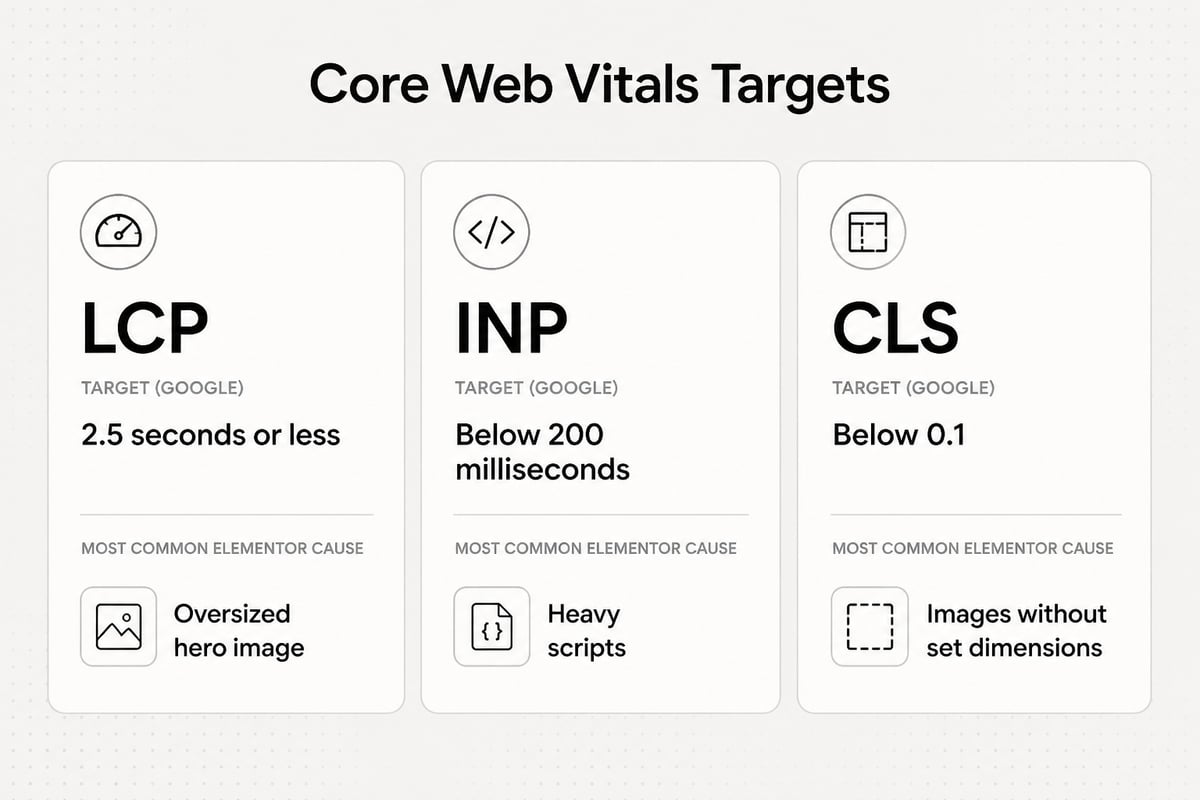
Here is how the common Elementor problems map to each metric:
Largest Contentful Paint
The largest element on most Elementor pages is the hero image or a background video. Fix it by:
- Compressing the hero image and serving WebP or AVIF.
- Replacing background videos with a static image on mobile.
- Not lazy-loading the image at the top of the page. Lazy-load everything below it.
- Using decent hosting. A $3 shared plan with slow server response will cap your score no matter what you tweak.
Interaction to Next Paint
Heavy JavaScript delays responses to taps and clicks. Remove widgets you do not need, cut third-party scripts such as chat widgets and extra trackers, and avoid stacking several animation effects on one section.
Cumulative Layout Shift
Layout shift comes from images without set dimensions, late-loading fonts and popups that push content down. Set width and height on images, host fonts locally, and give embedded elements reserved space.
A caching plugin and an image optimizer cover most of the rest. Pick one of each and stop. Running three performance plugins at once usually makes things worse.
Elementor WordPress SEO settings to set before you build
Set the WordPress basics first, because no builder setting fixes a misconfigured site. Elementor's own WordPress SEO checklist recommends three that matter most: set permalinks to "Post name," confirm that search engine visibility is enabled, and submit an XML sitemap to Google Search Console.
Do these in order:
- Permalinks. Go to Settings, then Permalinks, and choose Post name. Google's SEO Starter Guide recommends descriptive URLs, and notes that Google can use the words in a URL to understand breadcrumbs. A URL like
/elementor-seo-checklistbeats/?p=482. - Search visibility. Under Settings, then Reading, make sure "Discourage search engines from indexing this site" is unchecked. Sites get left in this state after staging more often than you would expect.
- SEO plugin. Install one SEO plugin for titles, meta descriptions and sitemaps. Our breakdown of the best SEO plugin for WordPress compares the main choices, and the WordPress SEO checklist lists the rest of the setup.
- Search Console. Verify the site, submit the sitemap, and watch the Pages report for indexing errors in the first month.
Pick one SEO plugin only. Two plugins writing competing title tags and sitemaps is a common source of duplicate-tag problems.
Build pages with clean structure
Elementor gives you full visual control, so structure is your job. Search engines read the HTML, not the design, so the order and meaning of your tags matter more than how the page looks.
Headings
Use one H1 per page, usually the page title. Then use H2 for main sections and H3 for subsections. In the Elementor Heading widget, you can choose the HTML tag separately from the visual size. Use that. Set the tag for meaning, then change the size with the style controls.
Text and images
Put real text on the page. Text inside images, or in a heavily styled widget that renders as an image, cannot be read by search engines. Write alt text for every meaningful image. Describe what the image shows in plain words, and skip stuffing keywords into it.
Links
Add internal links in body copy, and use descriptive anchor text. Link new pages from older, stronger ones. A landing page nobody links to is hard for Google to find and hard to rank.
Structured data
Google says WordPress users can add structured data through CMS settings or a plugin, and warns against marking up information that is not visible to users. Your SEO plugin handles Article, Organization and breadcrumb markup. Elementor's SEO guide describes using the Yoast SEO and Rank Math integrations to edit snippets right inside the Elementor editor. Add FAQ or review markup only where that content is actually on the page.
A short Elementor SEO audit you can run today
Run this audit on your top five pages and you will catch most real problems in about an hour.
| Check | What good looks like | Where to check |
|---|---|---|
| Mobile LCP | 2.5 seconds or less | PageSpeed Insights |
| Heading order | One H1, then H2 and H3 in order | Browser extension or page source |
| Title and meta description | Unique, under about 60 and 155 characters | Your SEO plugin |
| Image size | Hero under a few hundred KB, WebP or AVIF | Media Library |
| Indexing | Page shows as indexed | Search Console URL Inspection |
| Internal links | At least two links in, two links out | Page source or site crawl |
| Unused widgets | None loading without a visible purpose | Elementor editor |
If a page fails two or more rows, fix that page before you publish anything new. Pages that cannot load or be indexed will not benefit from more content.
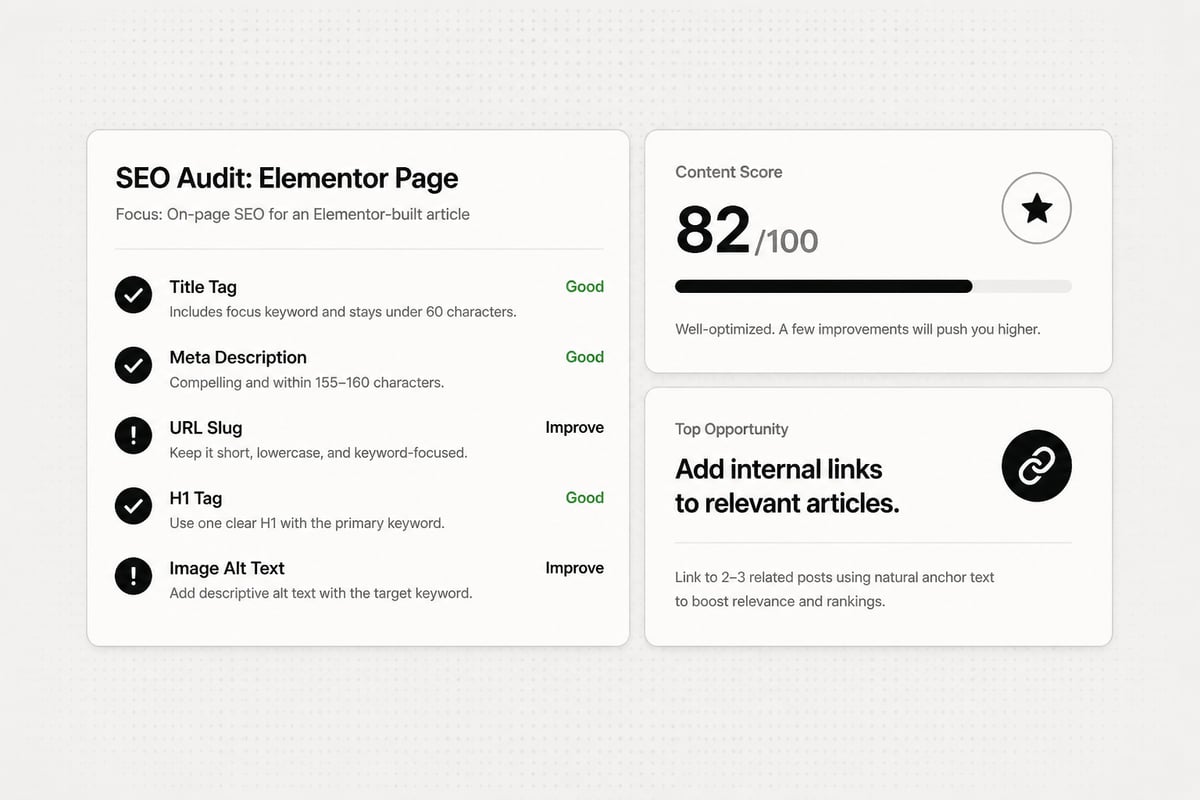
Elementor WordPress SEO needs content, not just settings
Technical setup gets you eligible to rank. Content is what actually earns traffic. A fast Elementor site with five landing pages and no blog has nothing to rank for beyond your brand name.
Many small business sites stall here. Setup is quick. Publishing useful articles on a steady schedule for months is the part that often gets dropped, because research, writing, images, links and publishing take time.
You have three honest options:
- Write it yourself. Cheapest in cash, most expensive in time. Works if you enjoy writing and can keep a schedule.
- Hire an agency or freelancers. Quality can be high, but agency SEO is often expensive, and freelance articles cost considerably more per piece than automated ones. See SEO costs for the ranges.
- Automate it. An AI tool handles the research, drafts and publishing, and you review what goes live.
If you want to understand how the third option works for WordPress sites, our guide to SEO automation for WordPress covers it in detail.
How to work on SEO in WordPress, step by step
To work on SEO in WordPress, fix the technical basics once, then run a repeating content loop. The same steps apply whether you build with Elementor or a standard theme.
- Set up the foundations. Permalinks, indexing, one SEO plugin, Search Console, a sitemap.
- Make the site fast. Hit the Core Web Vitals thresholds on mobile.
- Pick keywords you can win. Look for terms with real search volume and difficulty you can realistically beat. Our roundup of keyword research tools is a starting point.
- Write for the searcher. Match the intent. Answer the question in the first sentence, then support it.
- Link and publish. Add internal links, meta tags and images, then publish on a schedule.
- Review and update. Check Search Console monthly, then refresh articles that sit on page two.
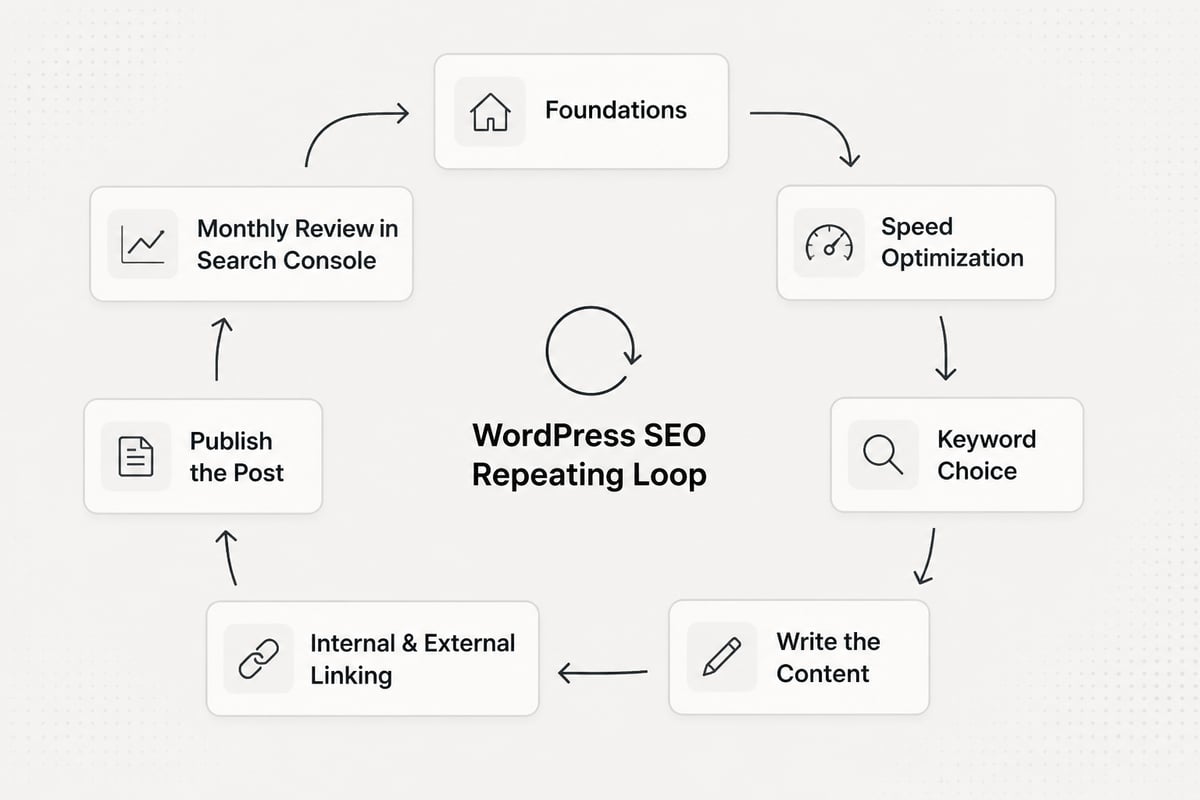
Steps 3 to 6 repeat forever. That loop is where time disappears, and it is the part worth automating if you run a small team.
Keeping the blog running on autopilot
A tool like RankPill can run the content loop for an Elementor site, as long as the site is on WordPress. It finds keywords your site can rank for using real search volume and difficulty, then writes and publishes articles straight to WordPress on the days and times you pick, at up to one a day.
Its SEO Content Writer studies the top results for a keyword, builds an outline that matches search intent, and writes an article of about 1,000, 2,000 or 3,000 words with cited sources, a meta title and description, internal and external links, and images with alt text.

Two practical points for Elementor users. First, articles publish as normal WordPress posts, so they use your theme's post template. If you built a custom single-post template in Elementor, check how the first few articles look before you let it run. Second, you can choose to approve each article or approve topics before they are written, so nothing goes live without your say.
It is not the right fit if you only want hand-written content. For everyone else, it replaces the hardest part of Elementor WordPress SEO: keeping the blog fed. The RankPill plan is $99 a month per website for 30 articles. New customers can start with a 3-day trial for $1.
Results take time. Many sites see early impressions within a few weeks, and steady growth usually takes a few months. There is no guaranteed timeline.
Is Elementor still worth it in 2026?
Yes, if you value fast visual building and your pages stay light. For SEO, Elementor is a reasonable choice in 2026 as long as you hold yourself to the Core Web Vitals thresholds and keep your structure clean.
Weigh it honestly:
- Choose Elementor if you or your team build and edit pages often, you want design control without a developer, and you will keep an eye on performance.
- Think twice if your site is mostly blog content and a few simple pages, since a lightweight theme with the block editor will load faster with less effort.
- Avoid heavy builds on weak hosting. The combination is where most "Elementor is slow" complaints come from.
Whichever you pick, the ranking work is the same. Technical hygiene gets you in the game, and consistent useful content wins it. The builder is a small part of that.
Search is changing, so write for AI answers too
SEO is evolving, not dying. People still search Google, but AI assistants like ChatGPT, Gemini and Google AI Overviews now answer a growing share of questions, and they pull from pages on the web.
That does not change the basics on your Elementor site. Clear headings, direct answers, cited sources and fast pages help you in both places. You do not need to rank first on Google to be cited by an AI assistant, and clear, well-sourced articles on the questions your customers ask are what get picked up.
If you want to see how often AI tools mention your brand, RankPill Plus tracks up to 50 prompts every day in ChatGPT, Gemini and Google AI Overviews. For more on this shift, read about AI and SEO and whether GEO is replacing SEO.
FAQ
Can ChatGPT do SEO?
ChatGPT can help with parts of SEO, such as brainstorming keyword ideas, drafting outlines and rewriting meta descriptions. It cannot see your search volume, your rankings or your site's technical issues on its own. Use it as a drafting aid, and pair it with real keyword data and Search Console.
Do I need an SEO plugin if I use Elementor?
Yes. Elementor builds pages but does not manage title tags, meta descriptions, sitemaps or schema. Install one SEO plugin alongside it and use that plugin's integration to edit snippets, so the two tools work together.
How long does Elementor WordPress SEO take to show results?
Technical fixes can improve speed scores within days, but rankings move slower. New articles often start earning impressions within a few weeks, and traffic usually builds over several months. It depends on your niche and how established the site is.
Run PageSpeed Insights on your homepage and your top landing page today, and fix whichever of the three Core Web Vitals fails first. Once the technical side is clean, the next gap is usually a blog that nobody has time to feed. Try RankPill to plan, write and publish articles to your WordPress site on a schedule you set.
Unlock Traffic on Autopilot
Grow organic traffic on autopilot. RankPill will research, write, optimize, and publish articles to your website daily.