
Shopify Collection SEO: A Practical Guide

Modest Mitkus · November 23, 2026
Shopify collection SEO is the work of making your category-style pages rank for the broad, high-intent searches your customers type before they buy. You do it by giving each collection a clear keyword target, a unique title and URL, helpful copy above and below the product grid, and strong internal links. Collections can rank well because they match broad category searches like "women's running shoes" or "oak coffee tables."
This guide covers the steps in the order you should do them. It also covers the parts that cause trouble on Shopify specifically, like duplicate URLs, filter pages and thin collections.
Why Collection Pages Matter More Than Product Pages
Collection pages often carry more search demand than individual products because many shoppers search by category first and by brand or model second. A query like "linen shirts" typically reaches a wider audience than any single linen shirt in your catalog. Collections also hold many products, so one ranking page can sell several items at once.
Google's own guidance backs the structure. It recommends linking ecommerce pages in a hierarchy: menus to category pages, category pages to subcategories, and subcategories to product pages. Collections are the middle layer of that hierarchy. If they are weak, both the top of your site and the products below it suffer.
There is a trade-off. Collections are harder to rank than blog posts for informational queries, because the intent is commercial and competitors are other stores with strong category pages. You win by being more specific and more useful, not by being longer.
Pick One Keyword Per Collection
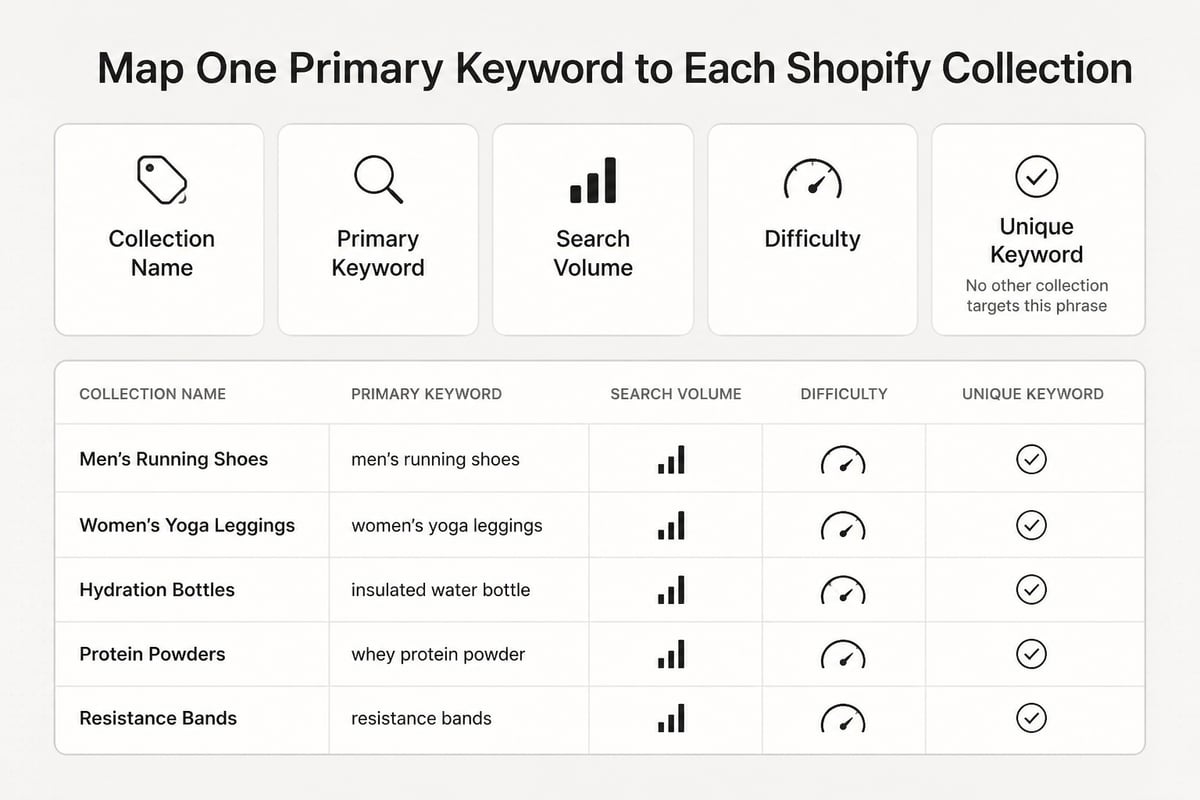
Give every collection one primary keyword and a few close variations, and never reuse that keyword on another collection. Two pages chasing the same phrase split your ranking signals and Google picks one at random.
Start with how customers talk, not how your inventory system names things. "Bedding" might be your internal category, but shoppers search "queen duvet covers" or "cotton sheet sets." Check real monthly search volume and keyword difficulty before you commit. A phrase with modest monthly search volume and low difficulty often beats a broad phrase you cannot realistically win.
Use this quick filter for each candidate:
- The phrase describes the products on the page, not a different group.
- A shopper typing it would want to see a grid of options.
- No other collection on your store targets it.
- Search volume exists, even if it is small.
If a collection has no real search demand, keep it for navigation but don't spend time on its copy. Focus your effort on the 10 to 20 collections with demand.
Write Titles, Handles and Meta Descriptions
Each collection needs a unique title tag, a clean URL handle and a meta description written for a click. Google recommends that each page have a unique, clear, concise title that accurately describes its content, and collections are a common place to leave the default title in place.
Title tag
Edit the page title in the collection's search engine listing section. Put the primary keyword near the front, add a modifier if it fits, and keep it short enough to avoid truncation. "Queen Duvet Covers | Cotton and Linen | Store Name" works better than "Duvet Covers - Home Page."
URL handle
Shopify builds collection URLs on the pattern /collections/collection-name, based on the collection name. Set the handle by hand. Use the keyword, drop filler words and avoid dates or seasons. If you rename a collection later, tick the option to create a redirect so you keep existing rankings and links.
Meta description
The meta description does not affect rankings directly, but it affects clicks. Write one or two sentences that name what is in the collection, mention a real differentiator such as free returns or materials, and match the page's content. Don't copy the same description across collections.
Add Copy That Helps Shoppers and Search Engines
A collection page needs some real text so Google can tell what the page is about, but the text must not push products down the page. A short intro of 50 to 150 words above the grid and a longer block below it is a practical split.
The intro should do a job for the shopper. Say what the collection contains, who it is for and one fact that helps them choose, like fabric weight or sizing range. Put the primary keyword in the first sentence where it reads naturally.
The lower block can go deeper. Good content for it includes:
- A short buying guide for the category
- Answers to the two or three questions customers ask most
- Care or sizing notes
- Links to related collections and a relevant guide
Avoid stuffing keywords into a 600-word wall of text nobody reads. If the copy exists only for crawlers, shoppers will scroll past it and Google will notice the page adds little. Placing copy so the product grid stays visible near the top is a common recommendation for collection pages.
Add alt text to your collection image and keep image files small so the page loads fast. Collection pages with many product cards can get heavy, so compress thumbnails and lazy-load below the fold.
Structure Internal Links and Navigation
Collections rank when your site links to them clearly and often. Google recommends standard <a href> links so Googlebot can find them, which means your main menu, breadcrumbs and in-page links should use real links, not buttons that load content with scripts.
Build the structure in this order:
- Link your top collections from the main menu.
- Link subcollections from their parent collection, near the top of the page.
- Link each product back to its collection with a breadcrumb.
- Link related collections to each other, such as "linen duvet covers" to "linen sheets."
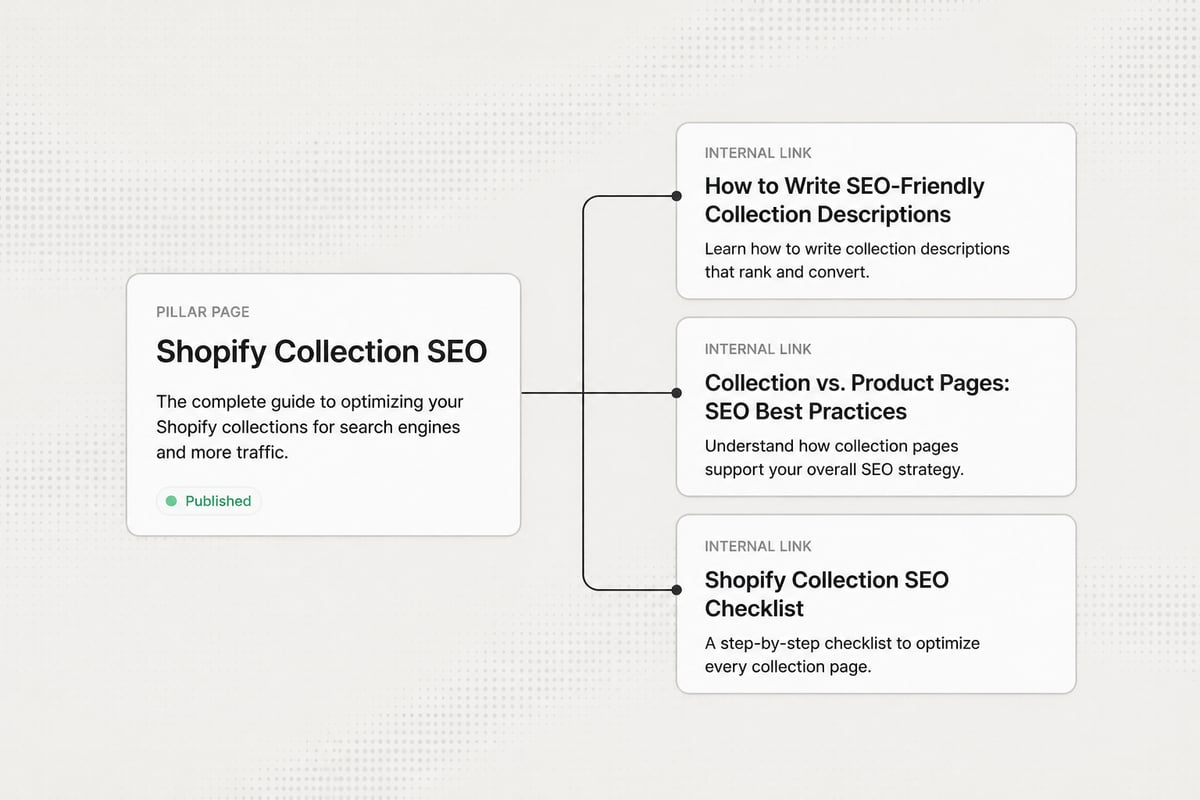
- Link to key collections from blog posts and guides using descriptive anchor text.
One Shopify quirk matters here. The same product can be reached at /products/handle and at /collections/collection-name/products/handle. Shopify normally sets a canonical tag pointing to the main product URL, but check that your theme keeps it. Link to the clean product URL where you can.
If you run a blog, it is one of the best ways to feed collections. A guide on how to choose a product type can link straight to the matching collection. Our piece on a Shopify blog strategy covers how to plan that, and the broader SEO for a Shopify store guide covers the rest of the site.
Handle Filters, Sorting and Pagination
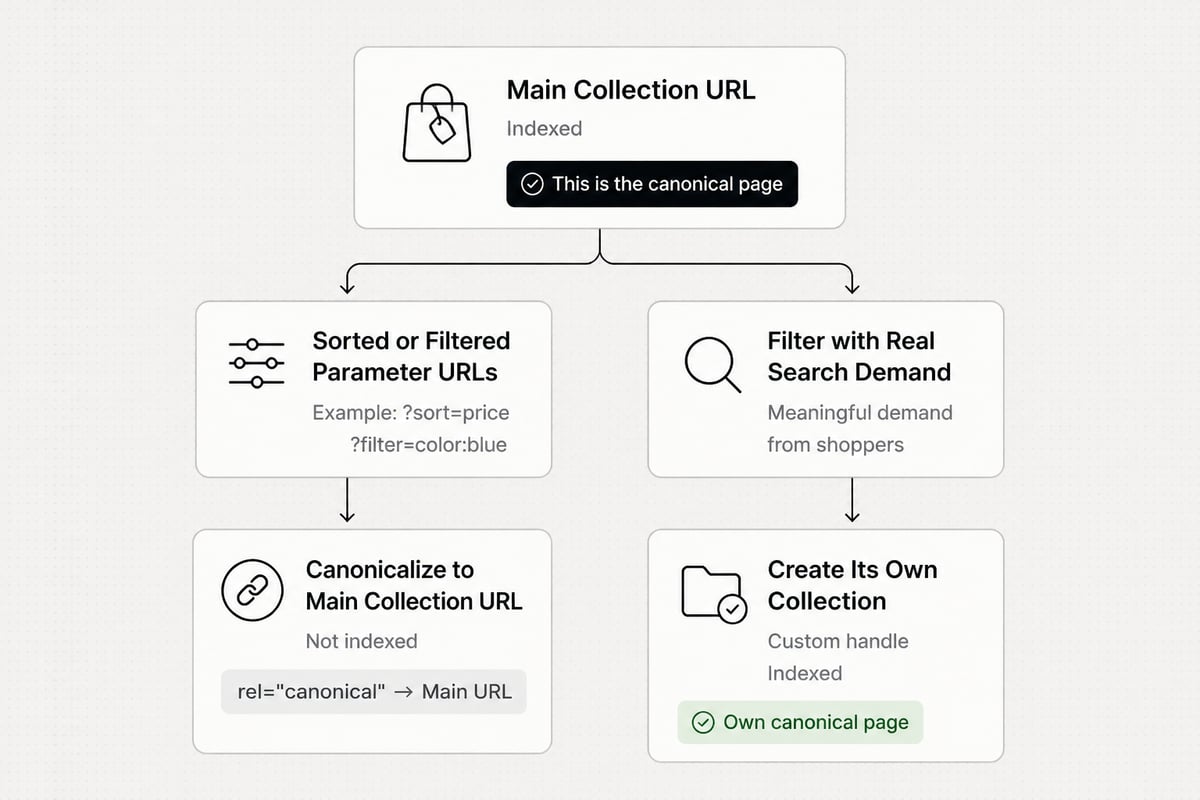
Filtered and sorted collection URLs can create hundreds of near-duplicate pages, so decide which ones Google should see. Shopify's storefront filtering adds URL parameters such as ?filter.v.price.gte=50 or ?sort_by=price-ascending. Most of these pages add nothing for search.
A sensible default:
- Let the main collection URL be the only version you want indexed.
- Make sure filtered and sorted URLs canonicalize to the main collection.
- Don't link to parameter URLs from menus or content.
- Avoid adding every filter combination to your sitemap.
There is one exception. If a filter matches a real search, like "red dresses" inside a dresses collection, it may deserve its own collection with a proper handle, title and copy. That is more reliable than trying to index a parameter URL.
For pagination, keep page 2 and beyond crawlable with normal links, and let each page keep its own canonical. Don't point all paginated pages at page 1, because that hides the products deeper in the list. Also keep collections from running dry: if a collection has fewer than four or five products, it is thin, and you should merge it with a related one.
Add Structured Data and Check the Technical Basics
Collection pages benefit from structured data and a clean technical setup, but they should not be marked up the way a single product page is. Google's ecommerce structured data overview explains the markup options, including product and product group data. Most Shopify themes already output product markup on product pages. For collections, breadcrumb markup is the safest addition, and your theme may already include it.
Run through these checks every quarter:
- Each collection has a unique title tag and meta description.
- Handles are short, lowercase and keyword-based.
- No important collection is blocked from indexing or missing from the sitemap.
- Empty collections are hidden or redirected, not left live.
- Mobile layout shows the intro copy and products without heavy scripts.
- Pages load in a reasonable time on a phone connection.
Use Google Search Console to see which collections get impressions and at what position. A collection sitting at position 8 to 15 with decent impressions is your best candidate for more copy, better links or a sharper title. Connecting Search Console is free, and it shows you where to spend effort.
Use Content to Support Your Collections
A collection page alone rarely wins competitive terms, so pair each priority collection with supporting articles. This is the gap that many store owners leave open. Collections answer "show me products," while articles answer "which one should I buy" and "how do I use it." Together they signal topical depth and send internal links to the collection. If you want the theory, our guide to topical authority explains why this works.
For each priority collection, plan two to four articles:
- A buying guide comparing types, materials or sizes
- A how-to or care guide
- A question-based post that targets a long-tail search
- A comparison between two product styles
Each article should link to the collection with anchor text that describes it, and to one or two relevant products.
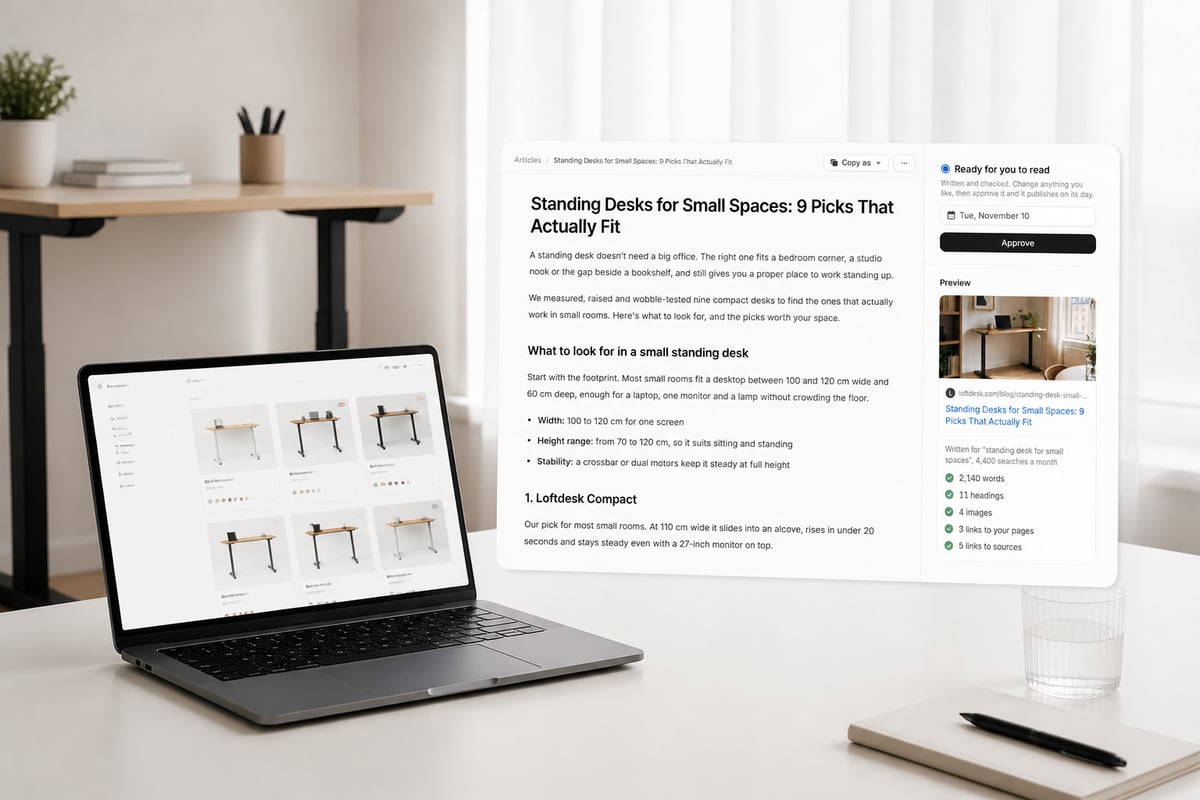
Most small teams stall here because writing takes time. This is where RankPill fits. It plans keywords from your site and live search data, writes articles of about 1,000, 2,000 or 3,000 words, and publishes them to Shopify on a schedule you pick. Each article includes internal links to your own pages and natural mentions of your products. The SEO Content Writer studies the top results for a keyword before it writes, so the outline matches what searchers expect. It is not the right choice if you only want hand-written content.
You can also read how SEO automation for Shopify works if you want the full picture before trying it.
Measure Results and Know What to Expect
Collection SEO is slow, and the first signs are impressions, not sales. After you rewrite titles and add copy, Google needs time to recrawl and re-evaluate the pages. It often takes a few weeks before impressions move, and several months before rankings settle. There is no fixed timeline, and it depends on your niche and how established the store is.
Track these numbers per collection in Search Console:
- Impressions and clicks for the collection URL
- Average position for the primary keyword
- Click-through rate, which tells you if the title and description work
Then check your store analytics for conversion rate from collection landing pages. Traffic that lands on a collection and leaves points to a mismatch between the query and the products shown, or to weak sorting. Put your best sellers first, and keep out-of-stock items at the bottom or hidden.
Review once a month. Pick the three collections closest to page one, improve one thing on each (title, intro, internal links or a supporting article), and check again in four to six weeks. Small repeated changes beat a one-time rewrite of every page.
Unlock Traffic on Autopilot
Grow organic traffic on autopilot. RankPill will research, write, optimize, and publish articles to your website daily.